Is Adinspiration worth buying? Test two layouts for the same product
Teams that already have brand assets and make static Facebook and Instagram ads can compare Adinspiration with their own Canva templates on one live brief. Measure handoff time, not the return advertised on the sales page.
If you refresh static Facebook and Instagram ads every week and already have product photos, fonts and copy cleared for commercial use, Adinspiration is worth evaluating on a real brief. If launches usually stall while people confirm product details, clear assets or approve copy, fix that first. More layouts won't make those approvals faster.
Buy a starting point, not a finished ad
Adinspiration's website sells a one-time purchase of Meta ad templates editable in Canva and says they work in both Free and Pro. That buys a starting layout; it does not establish that all extra fonts, assets or ongoing updates are included. Before paying, check that your team's Canva accounts can take over the file, which assets cost extra, whether a client can keep editing it and what can be used commercially. The returns advertised on the site are not results from your account.
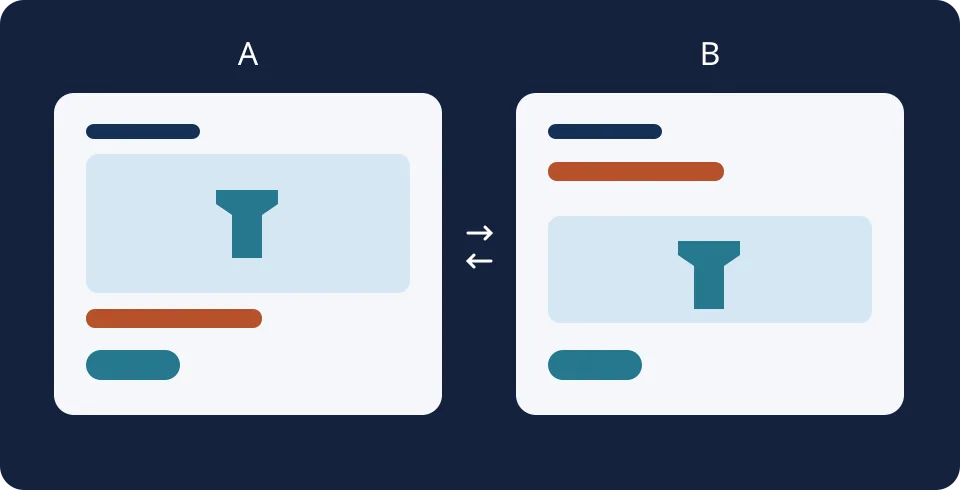
Say a small appliance team needs a weekend promotion. Build two versions with the same cleared photo, benefit and offer terms. A leads with the photo; B leads with the offer. Change only the order of information and keep the call to action, landing page and campaign conditions fixed. The drawing is an original layout example, not a product screenshot or a live ad.
Compare it with the Canva file you already use
Have one designer work from the same brief twice: first using your existing Canva template, then using a similar Adinspiration layout, starting with a sample if available. Export both at the sizes you actually need, such as 1:1 and 4:5. Ask a teammate to open the editable file in their own account and change a price. Then check on a phone that the offer conditions and call to action aren't cropped. Stop the clock when the ad can go to brand review; include replacing assets, resizing, missing fonts and rework. Repeat both routes with a second brief.
If both rounds are faster without extra asset costs or handoff problems, multiply time saved per ad by expected monthly volume to judge the purchase. If the timings are close, keep your existing Canva templates. If the job is to see what competitors have run, start with the Meta Ad Library. It shows public ads; it doesn't give you editable brand templates or reveal a competitor's conversion rate.
Content note:This article is based on publicly available information and is intended as a reference for evaluating tools. Features, pricing, and related policies may change at any time; please refer to the latest official information.
Original source:adinspiration.com