Should you use Adobe Firefly to expand product photos? Check the packaging first
Firefly can extend the background when a landscape product photo needs a portrait version. Decide whether to use it in batches by checking product fidelity and measuring time after review and rework.
Adobe Firefly is worth a small test if you need 4:5 versions of landscape product photos but don't want to enlarge the item until it touches the edges. Use it first on plain backgrounds, not to redesign packaging. A changed cap, logo, net weight or warning makes the image unsuitable for publication, however good the result looks. If the source already has room to spare, cropping is usually simpler.
Extend the canvas and preserve the original product layer
Adobe's documentation for Photoshop on the web puts Generative Expand inside the Crop workflow: extend the canvas and it can fill the missing area based on surrounding pixels. For a catalog team, a good starting point is an owned studio photo. Fit the 16:9 source proportionally in a 4:5 canvas and extend the background above and below. Keep the source or a separate product layer. Compare the finished image against the source as an overlay rather than trusting a prompt to protect the packaging. This original diagram is an acceptance example, not Firefly output.
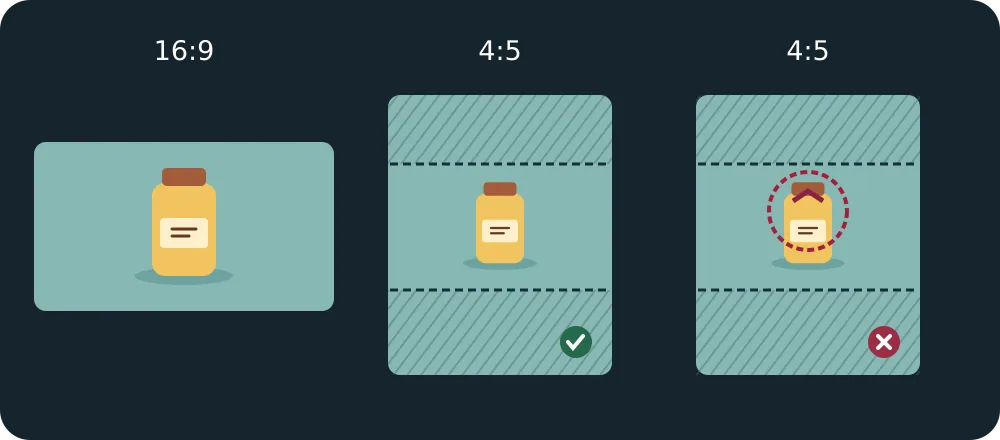
For a solid background, compare against a manual fill. For straight shelving, strong reflections or intricate prints, compare against hand compositing or reshooting. If each new background needs the seam, reflection angle or product silhouette repaired, don't make it your default batch workflow.
Calculate the review cost on ten real photos
Take ten photos cleared for uploading and commercial use, including solid colors, gradients and strong shadows. Use the same output sizes for both methods. Record generations, approved images and the minutes spent selecting, checking and reworking. Compare packaging, marks, text and shadows against the original; reject any change to product information. Compare total time per approved image, not the speed of the first draft.
Adobe lists this web feature as standard generation. Confirm the allowance and whether retries deduct credits on the account and plan that will actually be used. Log credits per approved image and scale that to monthly volume; even without a credit bottleneck, review still costs time. Adobe's generative AI terms make the user responsible for input rights and output use. Check commercial terms for the chosen model, account and client; permission for commercial use isn't a guarantee against third-party claims.
Content note:This article is based on publicly available information and is intended as a reference for evaluating tools. Features, pricing, and related policies may change at any time; please refer to the latest official information.
Original source:helpx.adobe.com