Buying Affinda for invoices? Check that a wrong total is stopped
Extracting data from several invoice layouts is not a reason to post automatically. Use synthetic invoices to compare Affinda with your current process on exception routing and cost per approved document.
Affinda is worth shortlisting when supplier invoices arrive in increasingly varied layouts and totals and taxes are buried in different places. Don't stop at whether it can read numbers. Before buying, prove that an inconsistent amount lands in front of a reviewer rather than being sent to accounting as a plausible result. If you only see a few stable layouts or process little volume, existing OCR plus a spreadsheet with validation formulas may cost less.
Extraction cuts typing; validation decides what passes
Affinda's invoice and workflow documentation distinguishes extraction, grounding and validation. It can read totals and line items, point back to where a field appeared and check configured business rules so exceptions can go to a person. A procurement test should not focus on average field accuracy. A correct invoice number does not offset a wrong total, still less a bad invoice that slipped downstream.
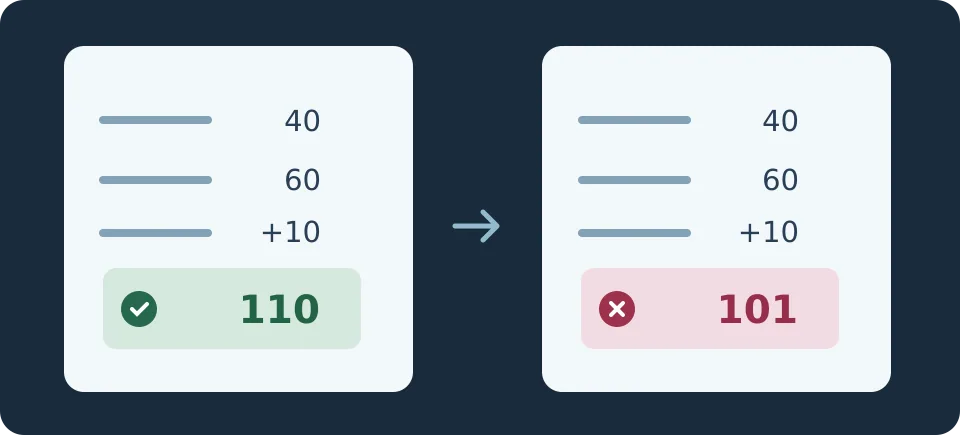
Create a synthetic invoice for a fictional supplier. Two line amounts of 40 and 60 plus tax of 10 must total 110. Keep that version and make one with 101 printed as the total. The pilot should distinguish an accurately extracted 101 on a wrong document from 110 misread as 101. Stop both; have the reviewer check the source page rather than silently correcting the original. The drawing is an original example, not an Affinda screen or a test result.
Compare review and handoff on the same sample
Use twenty entirely synthetic invoices without personal data. Include a clean PDF, a blurry scan, different date and decimal formats, duplicates, a missing key field and inconsistent totals. Write down expected values and routing before testing. Run the same set through your current OCR or manual process and through Affinda, with output going only to a sandbox spreadsheet. Don't connect production ERP or trigger payments. For duplicates, check that they are blocked within your intended scope without merging batches that should stay separate.
Count missed exceptions and correctly extracted invoices that were unnecessarily flagged. Check whether a reviewer can find the source and whether export matches the downstream format. Include setup, review and rework time per approved invoice; confirm the billing unit and any cost of reruns before buying. A wrong amount reaching the test sheet is a reason to fix the rules or keep manual approval. Expand only when errors are contained across layouts and total checking time drops.
Content note:This article is based on publicly available information and is intended as a reference for evaluating tools. Features, pricing, and related policies may change at any time; please refer to the latest official information.
Original source:www.affinda.com