Should you use Agenda Hero? Test rescheduling and time zones before importing an agenda
If you routinely turn PDFs or screenshots into calendar entries, use a synthetic agenda with a revision and a time zone change to see whether Agenda Hero actually saves entry time.
If an operations coordinator keeps typing a dozen events from screenshots or PDFs, Agenda Hero Magic is worth evaluating. The vendor shows that it extracts titles, dates, and times from text, images, and PDFs for review before sending events to calendars such as Google, Apple, or Outlook. It helps with data entry; deciding which notice is authoritative is still your job.
If the organizer already runs a reliable calendar subscription, try that first. A subscription may follow source updates depending on refresh behavior; a one-off .ics import is a snapshot. If there are only two or three clearly timed sessions, manual entry may still be faster.
Test with an agenda you wrote yourself
Say the original lists an opening at 09:00 UTC, a workshop at 10:00 UTC, and networking at 11:00 UTC. A revision moves the workshop to 10:30 UTC and cancels networking. Use synthetic material only. Start with the confirmed version in Magic; if you include both documents, say which item the revision supersedes. In preview, confirm there is one workshop, no canceled entry, and that dates and start and end times match the confirmed source. The 09:00 UTC opening is 17:00 that day in Singapore. If the source omits an end time, check it instead of treating an AI-supplied duration as fact.
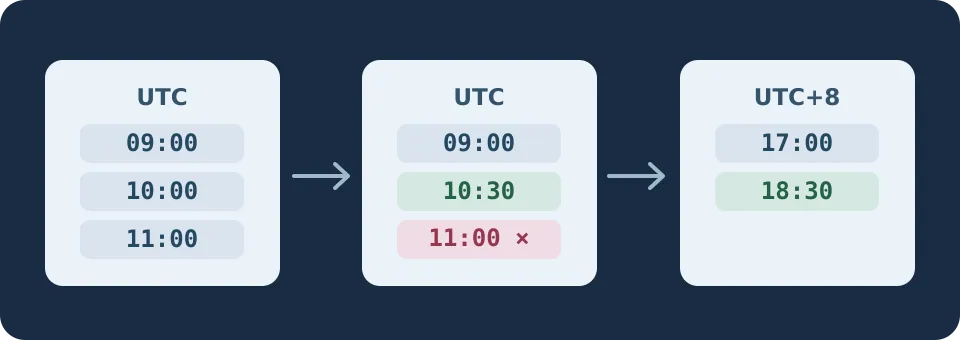
Review the destination calendar, not just the preview
Send the confirmed entries only to an unshared private test calendar with no guests. Check the date, time zone, and event count in the destination. Run a second agenda through both Magic and manual entry. Stop the clock only when the destination is correct; include sorting revisions, correcting extraction errors, and removing duplicates. Without a dependable update feed, do not reimport the entire revised agenda. Verify and edit only the entries that changed.
Consider paying if both rounds save meaningful time with no missed cancellation, move, or time-zone error. Then check PDF and image volume, destination compatibility, and plans. If dates move frequently and everyone must get the update, stick with the organizer’s subscription or the existing invitation workflow. An import utility is not your notification system.
Content note:This article is based on publicly available information and is intended as a reference for evaluating tools. Features, pricing, and related policies may change at any time; please refer to the latest official information.
Original source:agendahero.com