Is AgentSphere worth using? First verify that a report can be rebuilt after sandbox expiry
For teams evaluating a hosted sandbox: compare AgentSphere with your existing isolated job on a synthetic CSV, including waiting, retries and result retention.
AgentSphere is worth shortlisting if your product occasionally needs a temporary report per session and you don't want to maintain always-on workers. If inputs are predictable, jobs run in a fixed batch and your scheduler already provides isolation and retries, keeping it will often cost less. Startup time matters, but so does whether someone can still get a trustworthy report after stepping away.
Separate the execution session from the reproducible result
AgentSphere's Python SDK release illustrates creating a cloud sandbox for a job, and its documentation treats lifetime as a configurable boundary. Being able to read and write files while a session is alive does not establish that they can be recovered after termination or expiry. Isolation is not evidence that data residency, log retention or network rules meet your requirements. If inputs must stay on the machine, keep the offline option: AgentSphere is hosted, not an offline runner.
Walk through a synthetic case before committing. Two invented values, 10 and 20, should total 30. Route A leaves the operator with the synthetic CSV, rule and expected total. Route B leaves the result only in the temporary session. Suppose the sandbox expires while someone is waiting for review. Compare which route can rebuild the report from a fresh environment. If the inputs or verification record are missing, flag the result as failed or unverified rather than displaying a stale result. The drawing is a design example, not execution output.
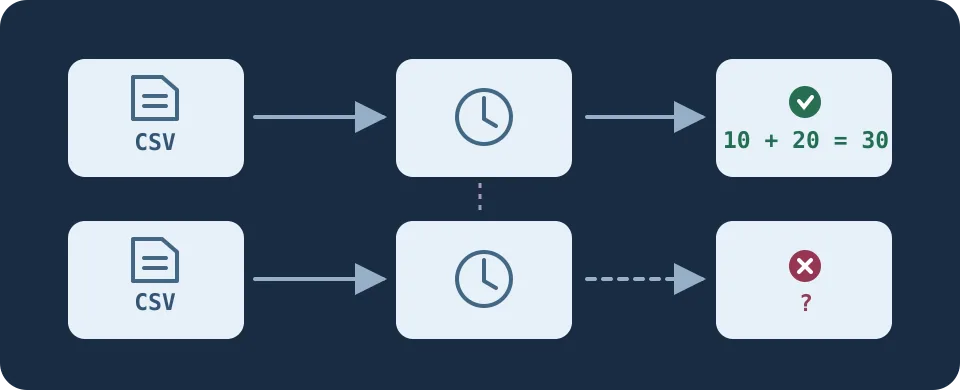
Figure 1. A sandbox's history is not the only record you should keep. The downstream team needs a result it can recreate.
Compare cost per approved report
Rehearse both immediate completion and a review timeout with the same synthetic input for the current isolated job and the AgentSphere design. Start with a local rehearsal and documentation review. Don't connect MCP, run unreviewed code, upload real files or expose a preview URL. Record time from request to handoff, separating startup, wait, retry and human checking. Ask how usage counts idle and running time, which concurrency caps apply and who can retain, log or download results. A single successful run is not a budget.
Once both routes can reproduce the result, compare total time and maintenance cost per approved report. Continue evaluating only if retries are explainable, job data remains separate and cloud waiting and usage costs are acceptable.
Content note:This article is based on publicly available information and is intended as a reference for evaluating tools. Features, pricing, and related policies may change at any time; please refer to the latest official information.
Original source:pypi.org