AI Depixelate buying guide: smoother edges, but is the shape still right?
Compare the original, ordinary enlargement and AI depixelation on a small design asset you own.
AI Depixelate reduces visible blockiness in small or compressed images. Test it for a cleaner preview if the high-resolution file is unavailable. If you still have the vector source, re-exporting is safer than guessing lost detail. Deliberate redactions, anonymized images and real people are outside this test.
Mark the geometry that cannot change
The vendor’s August 2026 guide distinguishes interpolation from learned reconstruction and notes that predicted detail is not the original. Draw a fictional arch with a round hole, a doorway and sloped sides. Make a deliberately low-resolution copy. Compare ordinary interpolation and AI at the same target size. Use the original vector as the answer key, not as another input.
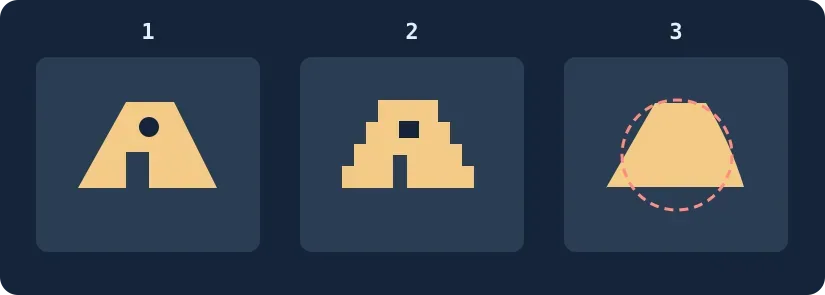
Original diagram: panel 3 is a hypothetical failure, not a product result. Smoother edges do not excuse lost geometry.
Prefer accuracy to softness
Inspect the silhouette at final display size, then zoom in on the hole, doorway and slopes. Require all three to remain in the same orientation without a distracting halo before comparing appearance. If AI fills an opening or changes the edge, keep the normal enlargement or redraw the owned vector. If both pass and the AI version looks less blocky, use it for display previews only. Do not treat a prediction as original evidence or a production specification. Upload only non-identifying material cleared for that service.
Content note:This article is based on publicly available information and is intended as a reference for evaluating tools. Features, pricing, and related policies may change at any time; please refer to the latest official information.
Original source:aidepixelate.com