Is AI Glot worth using? Check the SKU and multiline description after translation
Use a synthetic product CSV with a comma, a line break and a placeholder to see whether AI Glot produces a file you can hand off faster than manual localization.
If product catalogs arrive as CSVs and you batch-translate copy while another system owns SKUs and prices, evaluate AI Glot. The maker's tutorial shows translation modes, a glossary and CSV export; the site also shows selecting customer-facing columns only. For a few changes, a CSV-aware spreadsheet and manual editing are easier to verify. If you need per-string approvals, multiple reviewers and long-term terminology ownership, compare with your translation management system rather than racing to the first output.
Build a tiny table with a comma and a line break
Make two or three fictional products. No customer data, real inventory or credentials. Use sku, price, title and description columns. One row contains LMP-007, 19.90 and Desk lamp, matte; its quoted description spans two lines in one cell and includes {brand}. Select title and description only. Keep headers, SKU, price and the placeholder unchanged. Review column mapping, language and estimated usage before starting rather than assuming the whole file is in scope.
The developer says the service parses the grid, sends only selected cell contents to the model and rebuilds the CSV. That separates field boundaries from translation; placeholders inside those fields still need checking.
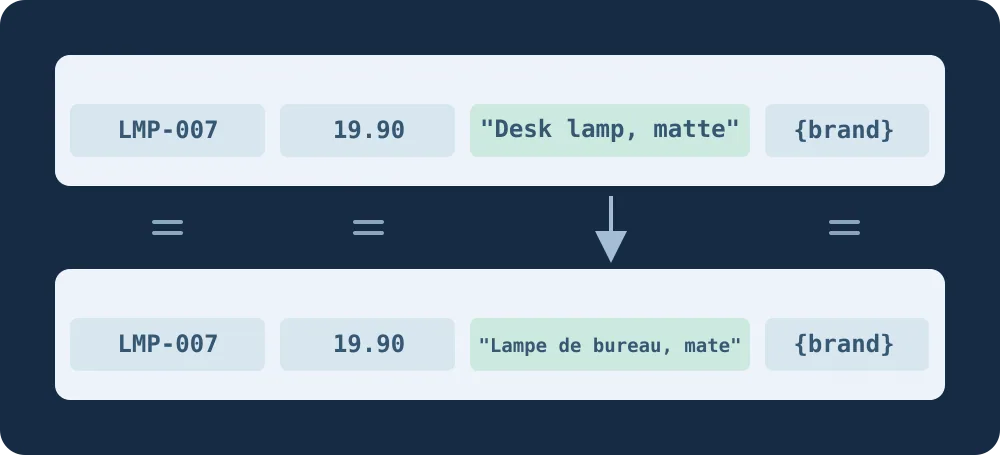
Figure 1. A file can look right on screen while parsing incorrectly. Check the field boundaries before handing it to an editor.
Parse the download, not a live store import
Open the export with a local CSV-aware reader that handles quoting and embedded line breaks. Read SKU and price as text: LMP-007, 19.90 and {brand} must stay exact. Check record and column counts and mapping. The comma must not add a field, and the newline must not add a record. Then have an editor review the translation and terms. Compare with the same sample handled manually, including mapping, repairs, re-export and verification. Expand only if both rounds preserve structure and save review time. If a protected value changes, stop before any production import.
Content note:This article is based on publicly available information and is intended as a reference for evaluating tools. Features, pricing, and related policies may change at any time; please refer to the latest official information.
Original source:gduv.club