Choosing AI Logo Art: Will the mark survive both banner and square crops?
Test an original mark in a scene and compare it with placing the approved logo on a separate layer.
If you already have a logo and need a wide event banner plus a square preview, AI Logo Art describes turning an uploaded JPG or PNG logo into promotional images, not designing a new mark. Its site recommends a simple input with few colors or letters and says placement and margins influence the composition. Try it to make the mark part of the scene. If the outline, colors and clear space must stay exact, make the background separately and overlay the approved source logo.
Test both actual crops
Draw a triangle and dot just for this test, with no client assets. Prepare two inputs at the same aspect ratio, moving only the mark, and give both the same scene brief. Mark the real wide and square crop boundaries on each result. Preview at phone size: the dot must survive, the opening in the triangle must remain clear, and the mark must still contrast with its background.
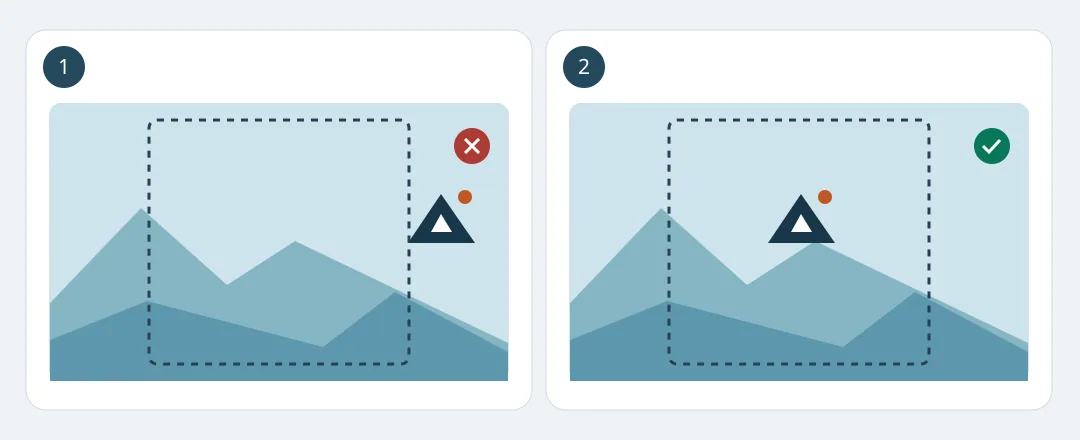
Figure 1. The dashed box shows the area both layouts retain. This is an editorial drawing, not tool output.
Count images that pass both crops rather than total renders, then include rework and review time. If every image needs a manual logo repair, use a layered template. The site FAQ mentions model training; keep confidential or unapproved artwork out of the trial. Before paying, check credits and refund restrictions once generation begins.
Content note:This article is based on publicly available information and is intended as a reference for evaluating tools. Features, pricing, and related policies may change at any time; please refer to the latest official information.
Original source:ailogoart.com