Choosing AI Photo Editor: Check acrylic cutouts on more than white
Use a photo of your own test piece to compare automatic removal with a manual mask on light and dark backgrounds.
If a clear acrylic piece with a hole needs a white catalogue photo and a dark campaign layout, decide whether you need a white image or a reusable transparent asset. The official ai-photo-editor.co site lists automatic background removal and describes a white background workflow. A good white result does not establish that the download has usable transparency. Try automation for a white-only batch; compare it with a local manual mask if you need reuse on different backgrounds or accurate translucent edges.
Check the same sample on two backgrounds
Photograph an unmarked acrylic sample with a round hole that you own. Keep the original nearby and use no faces or client files. Check the download for an alpha channel. If it has one, place the same export on white and deep navy. If it does not, treat it as white-only instead of mistaking white pixels for transparency. Zoom in: has the corner rounded, is the old background still inside the hole, or is there a bright rim? At the actual card size, make sure the shape still reads correctly.
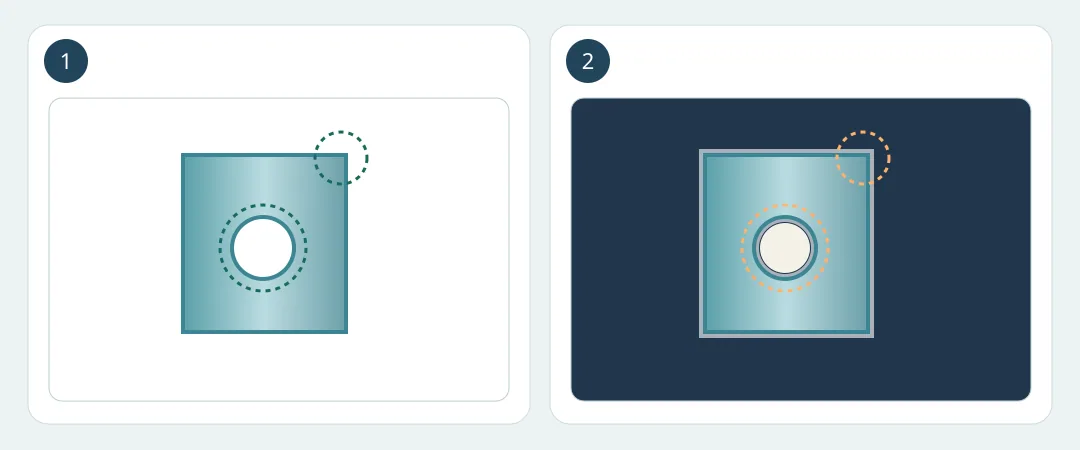
Figure 1. The circles identify the outer corner and inner hole. For a white-only listing, still check the original shape. This is a diagram, not tool output.
Try one simple opaque sample and one translucent sample with a hole. Record credits, selection time and edge repair. An accurate white result with fast review can be enough for the catalogue. For reusable cutouts, both backgrounds must preserve the hole and the genuine edge. If the dark background shows defects or every picture needs mask repair, stay with local layers and retain the original for comparison.
Content note:This article is based on publicly available information and is intended as a reference for evaluating tools. Features, pricing, and related policies may change at any time; please refer to the latest official information.
Original source:ai-photo-editor.co