Choosing AI Studios for dubbing: How 32 minutes of source video can use a 120-minute allowance
Teams with existing training videos should first identify who can review translations and which AI Studios plan lets them revise the script before export. Budget dubbing minutes across languages and reruns. A small subtitle-only job does not justify upgrading for lip-sync.
For teams localizing existing training videos, AI Studios’ AI Dubbing belongs on the shortlist if someone can review the translation and the budget includes rework. It handles videos made outside the platform. Videos made with an avatar inside the AI Studios editor use a different feature, Video Translation. Identify where the footage came from before choosing a plan. Unlimited AI video generation does not mean unlimited translation minutes.
This guide covers DeepBrain AI’s AI Studios, not another product with a similar name. It brings translation, dubbing, and optional lip-sync into one workflow, an appealing option for teams with recordings they would otherwise have to recreate with actors. But a few notices that work as subtitles may not justify dubbed video. The adoption example below uses fictional training material we own; it is not a performance test.
Check whether you can pay for proofreading before counting languages
The vendor offers the AI Dubbing Proofread editor on Team and Enterprise, not Personal. It lets you edit translated text, correct speaker assignments, replace a segment’s voice, and adjust its start and end times. These controls can matter more to a training team than the number of supported languages. For example, a fictional ticketing tutorial says, “Archive only after the owner approves.” Dropping “only” changes the rule. Being able to correct that line and listen again before generating the final video matters more than how realistic the lip movements look.
For acceptance testing, take one single-speaker clip you own and start with one target language. Ask a colleague who knows that language to check this condition, one product name, and one number, then confirm the audio, subtitles, and visuals all refer to the same action. Deliberately include an error in a fictional test script and ask for a demonstration that the corrected preview matches the final file. Do not send it to real trainees. Seeing corrected text in the editor is not enough. The vendor also warns that lengthening the translation affects speech speed, segments cannot overlap, and manual timing changes may disrupt the natural rhythm. Listen to the entire segment after changing words.
If one person occasionally makes a short video and can review the translation externally and verify the output, Personal is still worth comparing. If editing the translation before making the final video in the same product is essential, evaluate a plan with Proofread directly, or keep the existing workflow of manual dubbing or subtitles and editing. Do not choose a low entry price while leaving language review without an owner. The official dubbing documentation also says proofreading is unavailable when a single job includes multiple target languages. For multilingual work that needs proofreading, validate the acceptance workflow separately for each target language before estimating the workload.
A 32-minute source can use exactly 120 minutes
The pricing page distinguishes AI video counts, AI Dubbing duration, and generative credits for images and videos. Personal includes 120 minutes of AI Dubbing per month; Team lists 240 minutes per month. Dubbing minutes reset monthly and do not accumulate across a year with annual billing. Extra dubbing after the included allowance uses generative credits; unlimited video does not make reruns free. Team’s generative credits are supplied per seat and shared. Do not assume dubbing minutes also multiply by seat count. Ask the vendor to confirm the total allowance and overage rules for the account you are considering.
Suppose you have eight four-minute videos each month, need three target languages, and each output remains four minutes long. The first pass is 8 × 4 × 3 = 96 minutes. Redoing all three languages for two videos adds 2 × 4 × 3 = 24 minutes, bringing the total to exactly 120. Redoing another video in all three languages brings it to 132 minutes. This is a capacity estimate, not an actual invoice or a measured result. Confirm how changed output durations, actual deductions, and failed jobs are handled before purchase and export. List both the language versions you must deliver and those you may need to regenerate, rather than reporting only 32 source minutes.
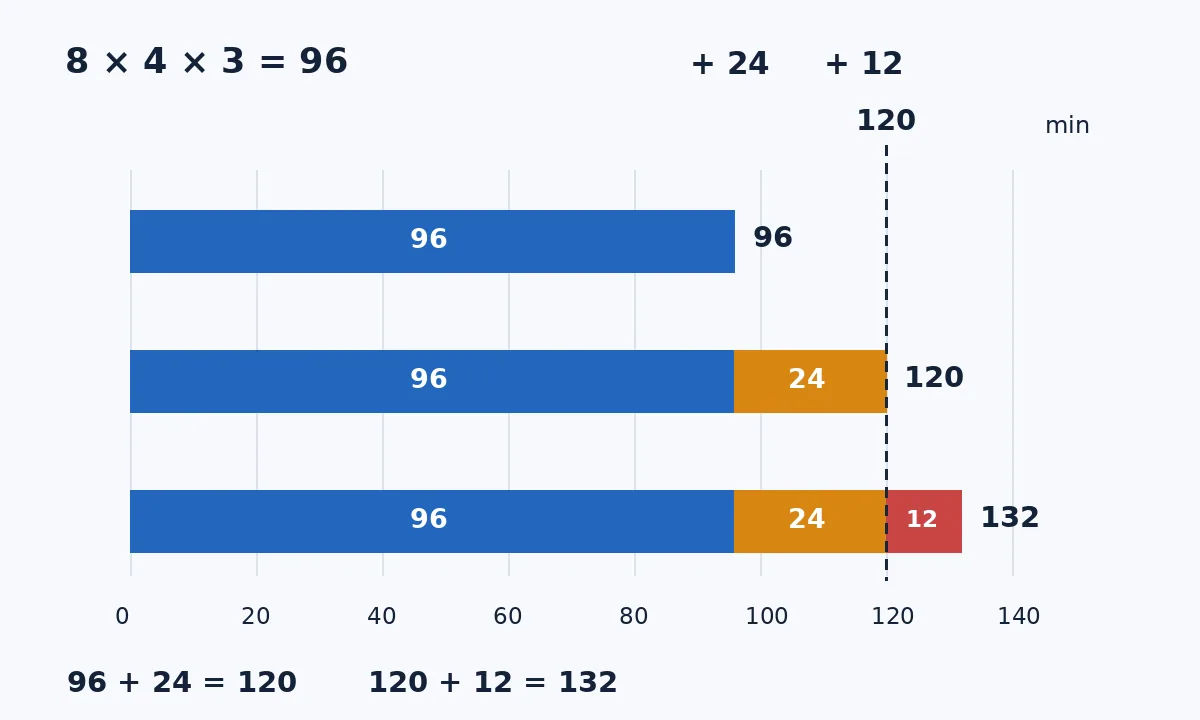
Original budget illustration, not a product interface or measured result. Each output is assumed to last 4 minutes. Blue is the first pass, 8 videos × 3 languages, or 96 minutes. Orange adds 24 minutes to redo 2 videos × 3 languages; red adds another 12 for 1 video × 3 languages. The dashed line is Personal’s 120-minute monthly reference allowance, not a guarantee of actual deductions.
Compare prices over the same period. With annual billing, the pricing page displays Personal at the equivalent of US$24 per month and Team at US$55 per seat per month. Annual billing is charged once a year, not the cash cost of a one-month project. Obtain a total quote that includes the actual seat count, billing period, taxes, and required add-ons. Then add review, trimming, and rework time. Confirming scripts and reviewing language also cost time in a manual workflow, so count them on both sides. Waiting for generation, fixing exceptions, and extra allowance are incremental costs for the AI route. An upgrade only makes sense if net production savings cover the added costs.
An upgrade may not help if the shot is unsuitable
The vendor’s dubbing recommendations are specific: keep the face clear, avoid microphones or subtitles obscuring features, use even lighting, and show one speaker talking at a time. People talking over one another, frequent cuts, and faces turning sharply are unsuitable as representative tests. If the visuals are only slides or a software demonstration, try assessing dubbing without lip-sync first. If no lips are visible, there is no need to add a review step just to make the output look like the original speaker. The official documentation says the default clones the original speaker’s voice, and you can choose a library voice instead during proofreading. Uploading a recording of a real person is not a trivial step. Before a real business trial, use only materials you own or have permission to process. This test example uses fictional content and a synthetic voice that does not imitate a real person. Do not upload colleagues’ faces or voices without consent or pass synthetic narration off as a real person’s endorsement.
A team well suited to adoption should be able to produce three things: a finished sample approved by a language reviewer, a dubbing-minute budget that includes reruns, and a same-period quote comparison that covers review and seat costs. If all you have is an impressive lip-sync demo and nobody can tell whether the condition was translated correctly, keep subtitles or manual dubbing for now. AI Studios can bring production steps together, but a person still needs to approve the training content.
Content note:This article is based on publicly available information and is intended as a reference for evaluating tools. Features, pricing, and related policies may change at any time; please refer to the latest official information.
Original source:web.archive.org