AI Toolkit Pro buying guide: Is drafting inside WordPress worth another plugin?
Compare total editing, review and maintenance time on an approved test site. Model API usage is billed separately from the plugin license.
If editors move rough drafts from a generation tool into WordPress every week, then add titles, links and paragraph formatting, AI Toolkit Pro is worth comparing on a test site. Its value is bringing AI-assisted writing into the WordPress workflow, not making the model part of the site. According to the vendor, site owners configure their own account with a supported provider such as OpenAI or Anthropic Claude. Prompts, drafts or page content needed for generation may be sent to the selected provider, and model usage is billed separately from the plugin license. If drafts are not allowed to leave the site, or fact-checking rather than moving text is the real time sink, there is no need to install a plugin just to switch tabs less often.
Use the same material for both routes
On a test site that is not connected to production data, use event notes you have written yourself: preserve “starts at 14:30, 40 places, no rescheduling after registration closes” and a test link, and ask for a title, two body paragraphs and a clear registration reminder. In one route, have the plugin help with drafting, then let an editor turn the result into an unpublished WordPress draft. In the other, use the team's approved writing tool, then paste the result manually into the same editor. Check both against the same list: whether the event details and negative statements survive, whether the link is the test address, whether the title has been repeated in the body, and whether the paragraphs remain editable in the editing preview. Identify the time spent copying and formatting; do not count fact-checking that is needed anyway as time saved by the plugin.
Time saved on editing must cover maintenance and review
Set a threshold for the trial: both routes must first pass the content and preview checks. Suppose you handle 30 articles a month and actually save 4 minutes on each, for a total of 120 minutes. If maintaining the plugin adds 45 minutes a month and reviewing what data is sent adds another 25 minutes, 50 minutes remain. Convert those 50 minutes into money using the team's actual editorial labor cost, then compare that value with the additional license fee and the difference in model-call charges. At 120 yuan per hour, for example, the maximum labor-cost benefit is 100 yuan a month. Include requests rerun after failures in usage, too. If both routes require payment for the same model, compare only the difference in usage; do not count the entire API bill again as a plugin cost. These numbers are a budgeting example, not measurements or a vendor quote.
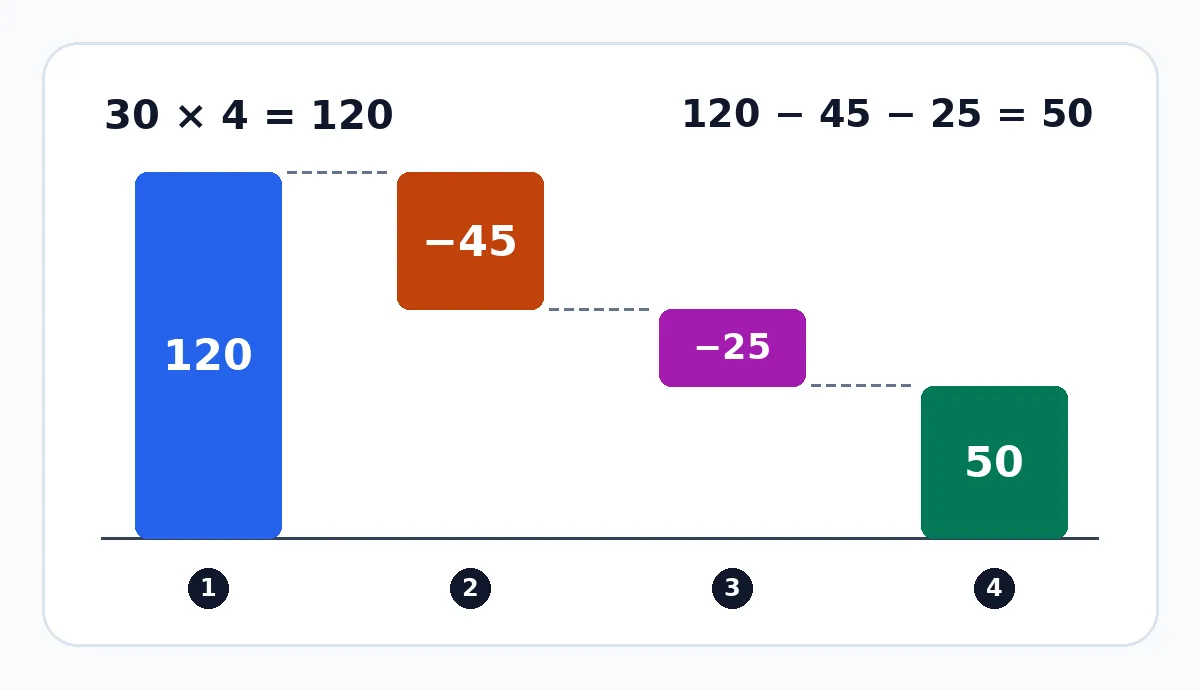
Original hypothetical monthly budget example, not a performance benchmark: 30 articles × 4 minutes saved − 45 minutes of plugin maintenance − 25 minutes reviewing outbound data = 50 net minutes saved per month.
Before formal adoption, an administrator should confirm which editorial tasks actually need to be enabled, whether the test site can remain isolated from live publishing, and whether the team has approved the selected provider's data processing. Do not upload customer information or paste real credentials into prompts to test the boundaries of outbound data. If drafting, moving content, reviewing and maintenance together produce no net time saving, or the monetary value of that saving does not cover the additional costs, stay with the existing tool and WordPress's built-in drafts. Consider a limited rollout only if copying and formatting really are the bottleneck, the sample drafts all pass review, and the value of the net saving exceeds the additional costs.
Content note:This article is based on publicly available information and is intended as a reference for evaluating tools. Features, pricing, and related policies may change at any time; please refer to the latest official information.
Original source:aitoolkitpro.ai