Choosing Aider: Review the patch before letting AI edit the code
Test whether a Git review can separate and undo one AI patch without losing a human edit in the same file.
If the team works in a terminal and spends time reviewing changes across files, Aider is worth a small trial. Its Git documentation says that by default it commits its edits and first records any existing changes in a tracked file it is about to edit. That separates human and AI changes but may add a commit. A terminal workflow does not mean your code stays on the device; check both the editing model and the model that drafts commit messages. A team that reviews before committing or cannot send source to the selected service should not adopt the defaults blindly.
Separate the two changes
Use a temporary branch of a completely fictional loan-time calculator. Leave a pending edit to the help text in the same tracked source file Aider will edit. Ask it to change only minute display and add boundary tests for 59, 60 and 61. Check each commit: where did the help phrase go, what changed in the patch, and do the tests assert the intended behavior? Use only approved model settings and secret-free mock files. For a discussion that should not touch files, use a non-editing review instead.
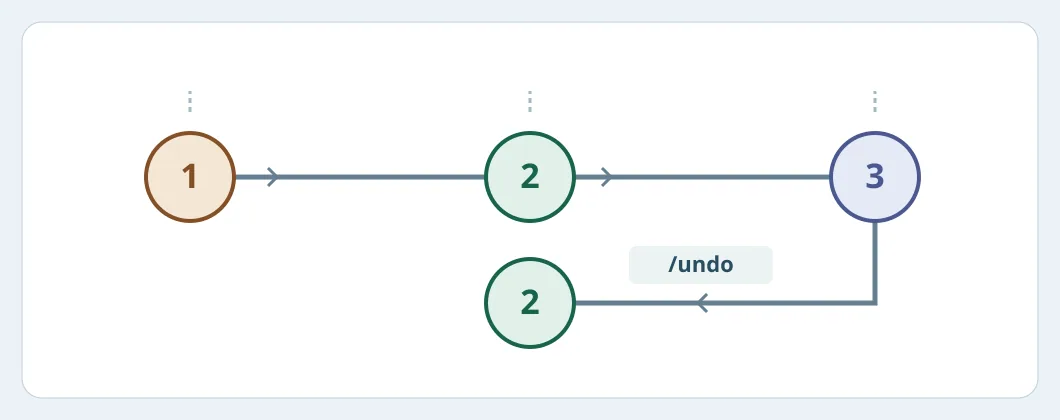
Figure 1. 1: pending help-text edit. 2: Aider records it separately. 3: AI code and tests. After verifying the latest commit, the example returns to 2. This is a diagram, not a test result.
Can you undo just the AI step?
After inspecting the change with the documented /diff or Git review, confirm the latest commit is the expected Aider patch and there are no later tracked changes to preserve. Only then rehearse /undo on the temporary branch. Verify that the human edit remains, the patch and its new tests are gone, and the expected prior state has returned. Undo does not retrieve content previously sent to a model provider. Aider’s docs say automatic commits skip pre-commit hooks by default; run approved checks separately rather than treating a commit as evidence a hook passed. The switches that disable AI auto-commits and pre-commits of existing edits are separate.
Compare total time to human approval, including rollback practice, tests and model charges. Adopt on small tasks only if diffs stay readable, human work survives and the total time drops. Keep manual editing or non-editing AI advice when code cannot leave approved boundaries, defaults conflict with policy, or review becomes more expensive.
Content note:This article is based on publicly available information and is intended as a reference for evaluating tools. Features, pricing, and related policies may change at any time; please refer to the latest official information.
Original source:aider.chat