Choosing Airbrush.ai: Check the landscape composition before upscaling 4×
Use a fictional still-life cover to decide whether Airbrush.ai is worth adopting. Cropping a square to 16:9 keeps only 56.25% of its height, and upscaling does not replace composition. Base the purchase on cropping, review, and rework per accepted image.
If you need fictional still lifes for a workshop article cover and social cards, Airbrush.ai is worth considering. If an image must faithfully show the construction, label, or color of a product for sale, use your own photographs. This is the image generator at airbrush.ai, not the similarly named Airbrush photo editor. Content editors need to know whether it saves work when delivering illustrations that fit the layout, not just whether it can make an attractive square.
The official workflow is to select a use, enter a short description, generate, and download. The FAQ lists generation sizes of 256×256, 512×512, and 1024×1024, with upscaling up to 4× and a maximum of 4096×4096. Multiple engines and upscaling expand the source choices, but those dimensions do not mean your landscape cover is already composed. Sketch the intended placements before comparing model names.
A sharp square may still not fit the landscape slot
Suppose a workshop introduction needs a square social card and a 16:9 banner showing an unbranded cup, books, and a vase. If you keep the width and crop to fill, the 1024×1024 square becomes 1024×576, retaining 56.25% of its height. A centered crop removes 224 pixels from the top and 224 from the bottom. If the top of a tall vase or the bottom of a book is in either strip, adding pixels will not bring it back into the banner.
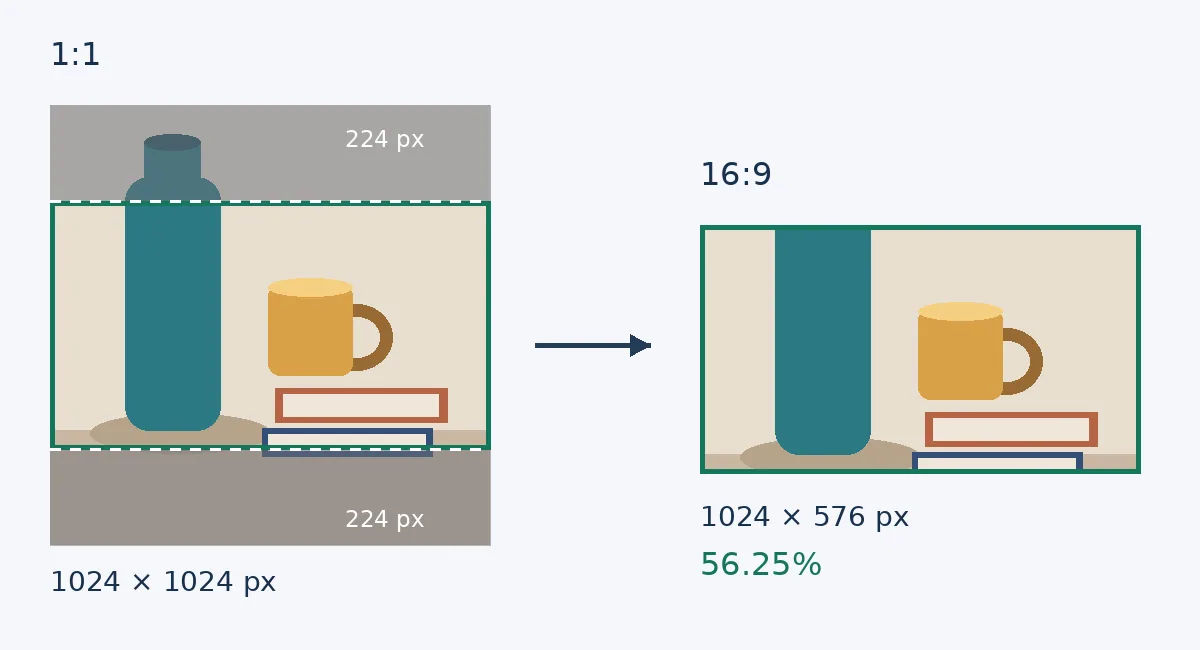
Original geometry illustration, not an Airbrush interface, generated sample, or measured result. Left: 1024×1024 square, with shaded bands of 224 pixels discarded at the top and bottom. Right: retained 1024×576 banner with the vase top missing. Upscaling 4× and cropping at the same ratio does not restore lost composition. No real products are shown.
This does not mean Airbrush cannot produce landscape artwork. It means you should check your actual placements before buying. Agree on the subject, negative space, and edges that must remain, then check whether the result works for both uses. If it does not, compose a separate image or place the entire square within the banner in layout software and accept empty space at the sides. Upscaling 4× addresses pixel dimensions, not the composition choice. If each image needs its subject redrawn, edges extended, and text rearranged, existing illustrations or your own still-life photos may take less work.
Count the cost per delivered asset, not generation attempts
The official pricing page lists 20 image credits for Free and 500 for Premium; both list upscaling, image history, and a public gallery. Do not count credits as finished images or infer the billing interval from a price label. Before buying, confirm the charges for the chosen engine, upscaling, and retries, and how the allowance renews. Save the full billing term and total at checkout. The public gallery listing does not establish whether all generations are public or private by default. For confidential work, confirm visibility and handling before uploading unpublished assets just because there is a paid plan.
Compare the two routes on a small scale with the same nonsensitive brief. For illustration only: four accepted covers from existing assets take 60 minutes. With Airbrush, writing descriptions and choosing images takes 18 minutes, cropping and layout 16, and review and rework 20. That totals 54 minutes, saving just 6 minutes across the batch. Both routes include checking the final placements. The example does not establish that paying is worth it. Compare actual monthly batch volume and the value of that saved time with the added plan cost. If the team already subscribes, compare remaining credits, top-ups, and incremental labor instead of counting the existing cost again.
Keep each finished asset’s original generated image, description, selected engine, and final crop together. When an editor needs another image in the same palette, they can build on that record instead of finding a superficially similar image in the public gallery. Check whether the cup handle is continuous, the page edges look plausible, and the subject remains clear at the actual display size. Keep text and accurate marks in an editable layout layer. Image-generated pseudo-text is not an approved title.
The vendor’s FAQ says generated images may be used commercially, including in print and merchandise. Fictional still lifes without brands or real people reduce the unnecessary rights checks in this example, but the platform’s license does not establish that a particular mark, character, or existing image is free to use. Do not deliver a fictional object as a photograph of a real product. For clients who need accurate product details, generated artwork is appropriate only as a clearly labeled concept proposal.
If you regularly need non-documentary illustrations, can recompose them, and save enough net effort across both actual placements to cover costs, start with a small Airbrush batch. If you mainly need faithful retouching of your product shots, preservation of intricate labels, or exact consistency of the same subject across placements, keep your existing photography and editing workflow. Make the purchase decision on a set of accepted, traceable assets with a clear delivery cost.
Content note:This article is based on publicly available information and is intended as a reference for evaluating tools. Features, pricing, and related policies may change at any time; please refer to the latest official information.
Original source:web.archive.org