AKOOL product backgrounds: keep the mask if the edges fail
A fictional part with a through-hole and a small tab makes it easier to tell whether only the background changed.
A seasonal backdrop shouldn't make buyers think the product itself changed. AKOOL demonstrated background customization in 2024, and its help center documents Background Change. Try it for secondary campaign images that need frequent variation. For many SKUs against one fixed background, a reusable manual mask and a template are the comparison to beat.
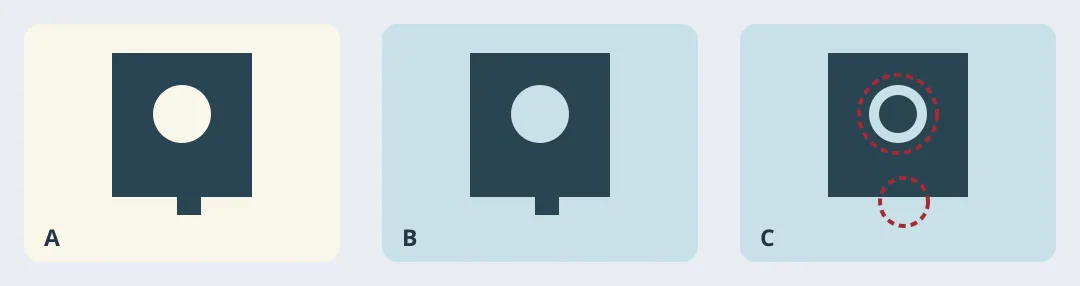
Figure 1. Original acceptance illustration, not AKOOL output. B goes to the next check; C goes back.
Score the part, not the scene
Draw three fictional parts yourself: a simple opaque piece, one with a hole and a thin tab, and one with a reflective edge. Match crop, size, and target background. Compare against each original at the same zoom. The hole must show the new background, the tab must survive, and reflections must not imply a different material. Check thumbnail size for a halo from the old background. Reject any miss, even if the new shadow looks better.
Compare cost per accepted image on the same set, including credits, rejected renders, touch-ups and review. Use AKOOL for secondary images only if all edges pass and that cost is lower than the mask workflow. Keep the approved hero image; check export specs and allowances for your plan before committing. The diagram is not a test result.
Content note:This article is based on publicly available information and is intended as a reference for evaluating tools. Features, pricing, and related policies may change at any time; please refer to the latest official information.
Original source:akool.com