Albato and Google Sheets: when the same ID arrives twice, how many rows remain?
Compare an isolated Albato rehearsal with updating a sheet by hand. A successful run is not the same as correct data.
For a handful of internal inventory corrections each week, looking up and updating an ID by hand can be less work than maintaining a connector. Albato is worth a trial if volume is higher and IDs are stable. Its release notes describe finding and creating or updating Google Sheets rows, and its test walkthrough checks the destination sheet. Those features do not give a sheet a uniqueness constraint or guarantee exactly-once writes.
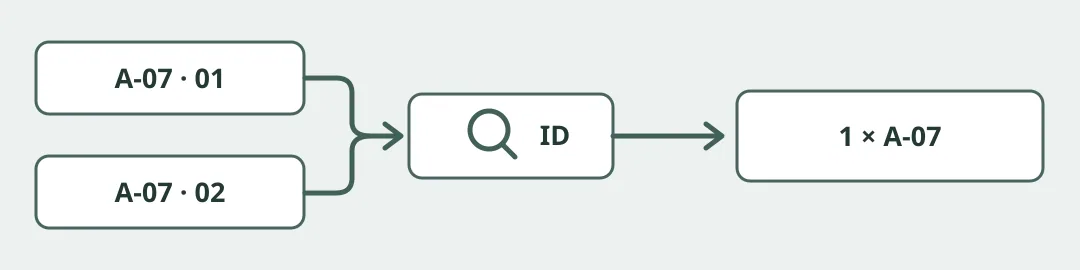
Figure 1. Original target-state diagram, not a run log. Check the last state as well as the row count.
Make repeated IDs expose mistakes
Use a local mock or an isolated rehearsal sheet with fictional data only. Connect no production system and send no messages. Change A-07 from pending review to complete, then repeat the second input. The correct result is one A-07 row, marked complete. Route multiple matches or uncertain event ordering to manual review instead of creating a row. Run a separate pair of nearly simultaneous inputs to see if lookup and update can race; a pass with sequential input proves nothing about concurrency.
Compare the same inputs for the manual and automated routes. Use one primary measure: the share of IDs that end with exactly one correct row. Require all critical fixtures to pass before comparing review time, troubleshooting and plan metering. If IDs are unstable or concurrency creates duplicate rows, keep the manual workflow or evaluate a destination that enforces uniqueness.
Content note:This article is based on publicly available information and is intended as a reference for evaluating tools. Features, pricing, and related policies may change at any time; please refer to the latest official information.
Original source:albato.com