Altair Inspire Studio: Surface modeling or the CAD workflow you already use?
Test a fictional desk object for seam continuity and an editable handoff, not just an attractive render.
Altair is a portfolio; this guide concerns Inspire Studio alone. The 2025 documentation describes NURBS, construction history and visualization, and the Blend guide specifies continuity options. Consider surface modeling for the transition between base and side of a decorative object. For a simple box driven by precise dimensions and rules, start with familiar CAD. A pretty render neither proves continuity nor ensures the recipient can edit.
Inspect the join, then make a change
Draw two toy profiles. A meets at the endpoint but changes direction abruptly. B joins at the same point and shares a tangent. Compare outline and a reflection view, marking the seam. Keep a corner if it is intentional, but do not call it smooth. A matching tangent does not establish curvature continuity. Change one outside dimension and recheck the target seam and overall width against their respective settings.
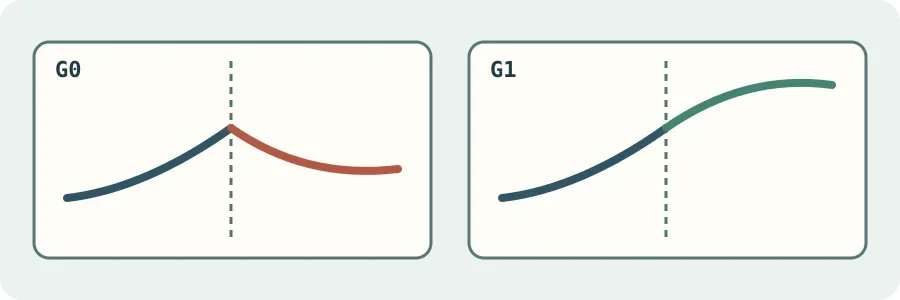
Original conceptual diagram, not an Altair calculation. G1 does not imply curvature continuity.
Choose after the handoff
Give a reviewer the native model, interchange file and preview separately. Ask them to locate the tangent setting and make one agreed edit. If they can only inspect an image or change the whole outline, record what was lost and keep the native project. Adopt only when shape iterations accelerate and recipients can edit the things they need. This toy comparison does not validate strength, manufacture or certification.
Content note:This article is based on publicly available information and is intended as a reference for evaluating tools. Features, pricing, and related policies may change at any time; please refer to the latest official information.
Original source:2025.help.altair.com