Choosing Analyzr: an importable prediction table may still use information from the future
Analyzr now uses the G2M brand. It suits teams with recurring prediction needs and consistent inputs they can maintain. Before adopting it, use fictional events to check the index, prediction target and cutoff time; matching column names do not establish that future information has been excluded.
A team estimating handout quantities for recurring small product briefings may not want to write model code from scratch every time. Analyzr’s no-code prediction approach can be useful, but the purchasing threshold is not simply whether a CSV can be uploaded and results exported. It is whether the next event can supply inputs with the same meaning. Analyzr has officially adopted the G2M brand, so check G2M Platform for capabilities and delivery scope rather than treating the old tool name as a separate service.
G2M’s variable guide assigns distinct roles to fields: independent variables are prediction inputs, the dependent variable in regression is a numerical target, and an index identifies records across ingestion, training and prediction. A type that cannot be detected automatically must be set manually. For event estimates, event ID E17 links the result back to its record, actual attendance is the target to predict, and registration information known in advance may serve as an input. An ID that enables reconciliation should not be used as a feature merely because it can be matched. A correct data type does not prove a value was available at decision time.
The same column name can contain data from two different times
Start with entirely fictional material: event E17 has 120 registrations seven days before it takes place, 150 final registrations on the event day, and actual attendance of 96. If the team decides how many handouts to print seven days ahead, inputs can include the 120 known then, but cannot look ahead to the later 150. When assembling a historical training table, the 96 recorded after the event can be the target. It cannot be slipped into the inputs available seven days ahead either. This is not a model run or a claim that these fields are enough to predict attendance; it simply establishes when each value becomes knowable.
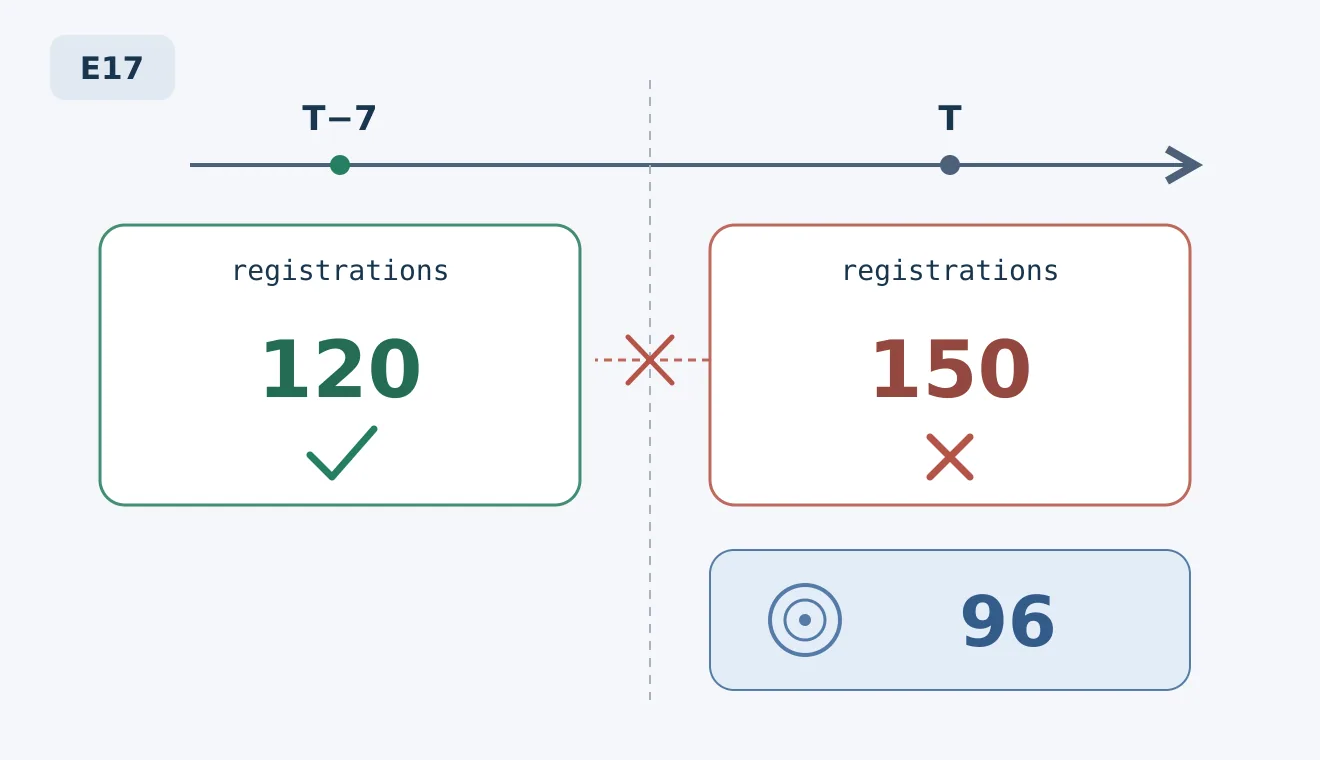
Original fictional example, not model output from Analyzr or G2M. T is the event day. Both 120 and 150 might appear in a column named registrations, but they become available at different times. Actual attendance of 96 is the historical event’s training target, not an input available seven days ahead.
G2M’s instructions for predicting with an existing model require the CSV to contain the same selected variables as in training, with identical column names. Extra unused columns are allowed; missing required variables trigger an error. That helps detect a structural mismatch, but it does not identify temporal meaning for the team. If registrations in the training table means the final count of 150, while the same column for the next event means 120 seven days beforehand, the files can have identical column names but inconsistent meanings. Make a registration snapshot seven days ahead an explicit data-delivery requirement. Put deliberately late values into several fictional rows to check how preprocessing detects or blocks them, rather than assuming the platform does so automatically.
Match the result back to the event before deciding whether you need a platform
The official instructions support loading a CSV in Predict, reviewing results and exporting them. Ongoing machine-to-machine prediction from a source system requires contacting an account representative or Support. Distinguish manual batch imports from continuous automated operation when purchasing: an export capability does not mean integration, update frequency and operations are already included. Start with fictional IDs to check which event, input snapshot and model version each exported prediction belongs to. Do not rely on row order happening to stay unchanged, or treat an illustrative-data rehearsal as evidence of model performance.
Performance requires a separate evaluation. Choose the model and a simple baseline using past training records only. One baseline could multiply the attendance ratio from earlier comparable events by registrations seven days ahead. Then compare errors on later events not used in that selection. Both approaches must use only inputs known at the same cutoff. Compare rework and waste from printing too few or too many handouts rather than relying on one attractive aggregate error metric. This is an acceptance design for the team to establish, not a verified default platform validation method. If there are few examples or the definition of an event keeps changing, recording snapshots and actual outcomes in a spreadsheet is usually more practical than adding a platform.
A purchase is worthwhile when prediction is recurring, the team can own input snapshots and exceptions, and the modeling and handoff time saved covers the quoted usage, connection setup and ongoing maintenance costs. Ask the supplier to specify what it delivers for CSV batch processing, continuous prediction integration and version traceability, then compare that with the existing spreadsheet workflow. Consider expanding only when results can be traced by ID, training and prediction inputs have consistent temporal meaning, and error comparisons meet a pre-agreed threshold. The fictional events here are for preparing handouts, not eligibility, financial or other high-impact decisions.
Content note:This article is based on publicly available information and is intended as a reference for evaluating tools. Features, pricing, and related policies may change at any time; please refer to the latest official information.
Original source:g2m.ai