Anima responsive card export: two design frames aren’t an acceptance test
Check long titles at 375, 620 and 1280 pixels against a hand-built static component.
The cards fit at 375 and 1280 pixels; a long title crosses the dashed edge at 620.
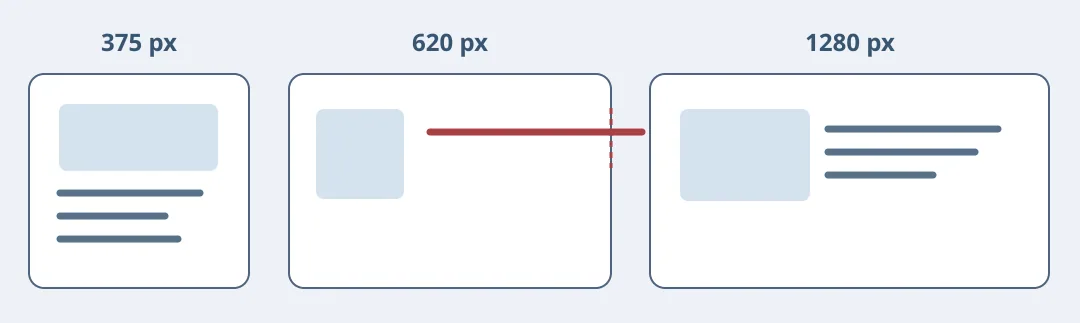
Figure 1. Anima’s 2024 documentation shows Figma breakpoints and Auto Layout exporting to responsive HTML and CSS. That is worth testing as a design handoff. But for a catalog card with one picture and a few lines, compare it with a small existing CSS component rather than timing export alone.
Test a width you never drew
Make a static catalog card with artwork you own. At 375 it stacks; at 1280 the picture sits alongside the text. Swap a short title for a long one and inspect both implementations at 620: text must wrap without covering the picture or adding horizontal scrolling, and reading order must remain intentional. Enlarge the body text and look for tight lines or clipping at the bottom. Preview privately with your own artwork; don't publish or connect a repository.
Compare time to accepted output, including style cleanup, breakpoint changes and wrapping checks. Pick the export only if all three widths and text enlargement pass and an engineer can find the wrapping rule without relying on another export for maintenance. Otherwise use the hand-built component. Confirm the chosen plan provides the source format you need.
Content note:This article is based on publicly available information and is intended as a reference for evaluating tools. Features, pricing, and related policies may change at any time; please refer to the latest official information.
Original source:www.animaapp.com