Is Animaker worth it for bilingual animation? Check voice and captions at the scene cut
Use one fictional clip to compare two voice tracks, caption files and revision effort.
Translation alone does not keep time
Make a 20-second guide for fictional exhibition equipment, with original shapes and narration. Both languages share the visuals. Animaker’s 2022 voiceover instructions describe adding voice; its caption guide covers manual cue boundaries. Editable tracks do not guarantee that a translation preserves action order.
Deliberately make one sentence too long
Cut at second 9 between “Close the model lid” and “Check the status marker.” Language A’s line runs from seconds 4 to 8; natural speech in B reaches second 11. Shorten the script or move the cut while preserving the instruction; do not speed up the voice or slide captions to hide overlap. Export both versions, check action and speech at normal speed, then watch muted to review captions.
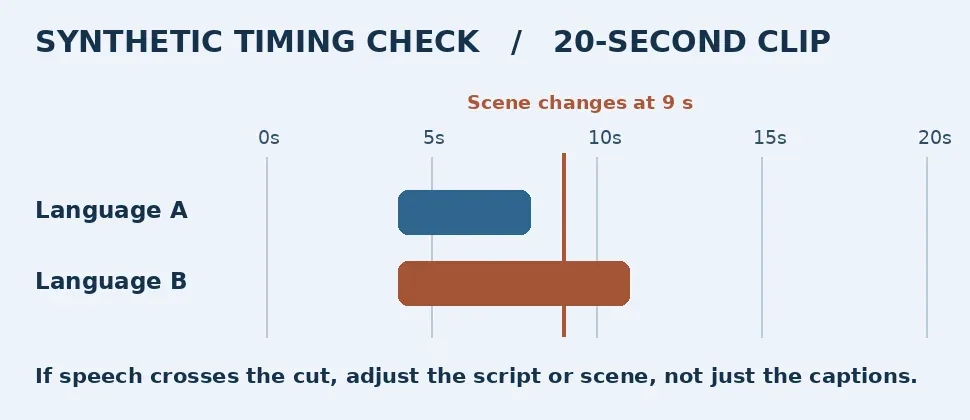
Original synthetic example, not an Animaker screenshot or render.
Test on the delivery player
In both versions, require keywords before the action changes and no overlapping cues. For an independently editable or switchable track, verify the plan and needed format, such as SRT, against the official updates and open the file in the target player. A video with burned-in captions does not prove sidecar compatibility. Use only original materials, no client assets or third-party voices.
Pay for time saved on revisions
Once both versions pass, change one action word and time rerecording, retiming, export and bilingual review. Compare a local editor, your own voice and a separate subtitle editor. Keep the tools you have for a one-off. Pay only if reusable animation saves work, the plan supports the needed formats and download volume, and review does not erase the gain.
Content note:This article is based on publicly available information and is intended as a reference for evaluating tools. Features, pricing, and related policies may change at any time; please refer to the latest official information.
Original source:support.animaker.com