Is Apex Vision AI worth using for adult self-study? Replace “I understand” with a changed problem
Apex’s on-screen reading and sidebar follow-ups may suit adults who frequently practise on webpages. Before paying, check that it captures every condition and helps you solve a changed problem independently; an occasional calculation may not justify another extension and subscription.
When you return to statistics after starting work, the difficulty is often not obtaining a number but understanding why this problem needs weighting by headcount. Apex Vision AI is a study assistant, not an industrial visual-inspection tool. Its potential value is keeping a webpage question and its explanation in one browser workspace. If you rarely need repeated follow-up explanations, your existing textbook, calculator or chat tool may already suffice.
The official multiple-choice guide describes a Chrome extension that reads questions on screen, provides explanations, and allows further questions and image analysis in a sidebar. That supports a learning workflow worth trying, not a guarantee that every image is read completely or every explanation is correct. The vendor’s accuracy claims cannot validate your own question types. This article uses only original adult self-study exercises, with no connection to real courses, exams or work materials.
Check the input before the reasoning
Suppose a fictional exercise says: group A has 3 people, each taking 10 minutes to process one practice card; group B has 1 person taking 30 minutes. What is the average time across all four people? The full question gives (3×10+1×30)÷4=15 minutes. Simply adding the two group means and dividing by two gives 20 minutes. Both calculations look straightforward; the difference is whether “3 people” and “1 person” were retained.
In an approved demonstration using this self-made question, first check which conditions the tool actually used. If the interface does not list them clearly, ask it to restate the headcounts, units and quantity being sought. If a screenshot omits the headcount line, supply the full question again. If your environment does not permit an extension to read that page, use an approved text-input route instead. Do not judge reasoning from a guess about missing conditions, or treat a fluent explanation as proof of accurate question capture.
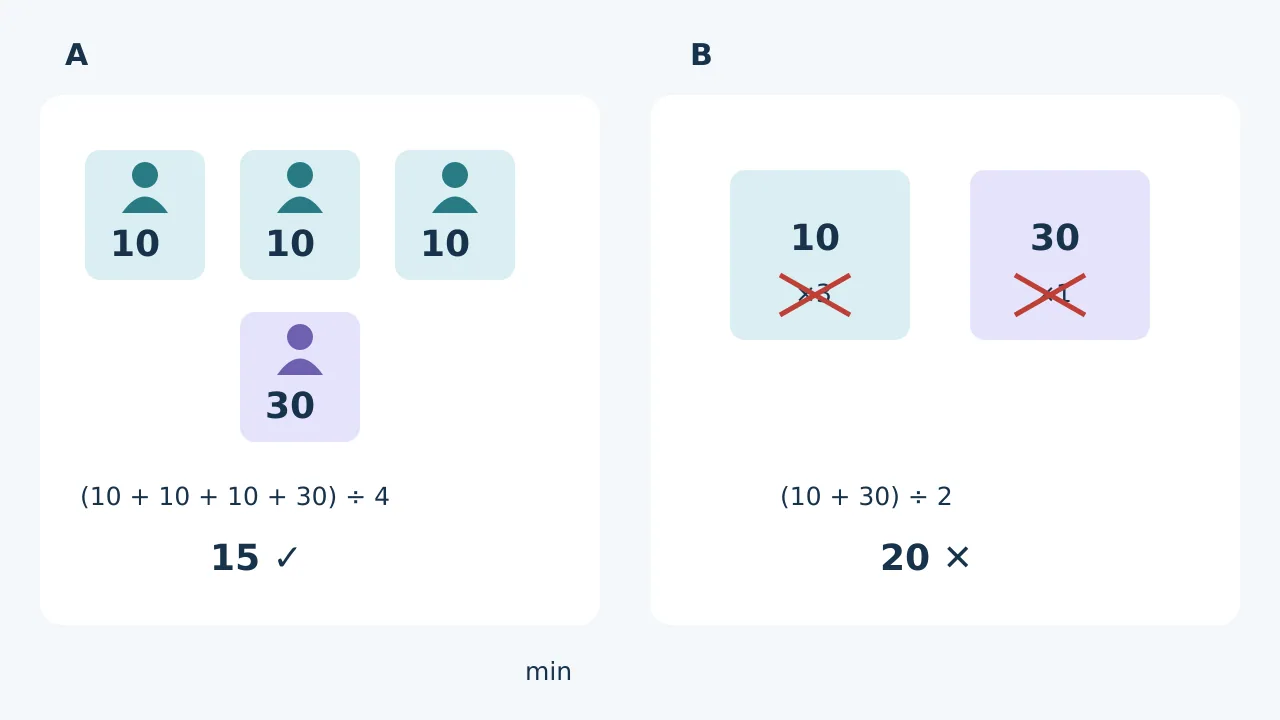
Original adult-practice illustration, not Apex output or a test result. The mean of four observations is 15 minutes; counting each group once gives 20 and ignores the difference between 3 people and 1. In the changed problem, making group B 3 people too makes 20 the new correct mean.
Then ask, “Why can’t I average 10 and 30 directly?” A useful explanation treats each person as one observation rather than merely naming a formula. Check the four numbers 10, 10, 10 and 30 with a calculator, then see whether the explanation agrees. Apex’s sidebar lets you continue asking without leaving the question: a specific interaction convenience. Whether it reduces switching and correction compared with your existing chat tool must be compared on the same exercises, not decided by promotional copy.
Before paying, close the hints and try another problem
Write a second problem: groups A and B each have 3 people, with individual times still 10 and 30 minutes respectively. Without looking at the assistant, independently write (3×10+3×30)÷6=20 minutes and explain why the two group means can now be averaged directly. Restating the first question correctly but copying 15 into the second does not demonstrate mastery. These two toy questions can screen a demonstration, not establish long-term learning effects. Also choose a small set of questions you frequently encounter whose answers can be checked in a textbook or by a person, and record misread conditions, reasoning errors and unaided re-solving results.
The official safety guide lists concept explanations, checking your own work and extra practice as study assistance, while explicitly opposing prohibited use in closed assessments. Supply only material you created or have permission to share, not internal company spreadsheets, other people’s information or restricted question banks. Convenient screen reading also calls for checking extension permissions and which pages it may read, rather than exposing unrelated content just to avoid one copy-and-paste.
Paying makes sense if you frequently study on webpages, capturing complete questions really is easier, reviewed explanations are useful, and unaided practice with changed conditions helps. Compare the subscription, request or feature limits of the relevant plan and the time spent checking errors; confirm the needed features on the purchase page rather than assuming free installation provides enough usage. If you mainly need occasional calculations, or spend more time correcting recognition and reasoning each time, keeping your existing tools is the better fit.
Content note:This article is based on publicly available information and is intended as a reference for evaluating tools. Features, pricing, and related policies may change at any time; please refer to the latest official information.
Original source:apexvision.ai