App0 buying guide: clickable preview or handoff-ready prototype?
Three inventory checks in a fictional prop-cupboard app show whether the export is worth handing over.
Use the App0.ai preview to discuss whether a screen is easy to navigate. If a colleague must continue developing it, review the exported project. The official changelog records natural-language builds and containerized previews on July 1, full project import/export on July 8 and downloadable showcase source on August 12. Showcase source and your own export are different; neither substitutes for handoff acceptance. (Official changelog)
Catch false success with three inventory states
Use a fictional theater prop cupboard starting with three paper lanterns. A: one loan takes available stock from 3 to 2. B: reject a duplicate submission of the same loan; stock stays at 2. C: a single return takes it from 2 to 3. Put each result in the handoff checklist. Compare the screen, rule and expected behavior after reopening. The example uses no accounts, notifications, real inventory or outbound requests.
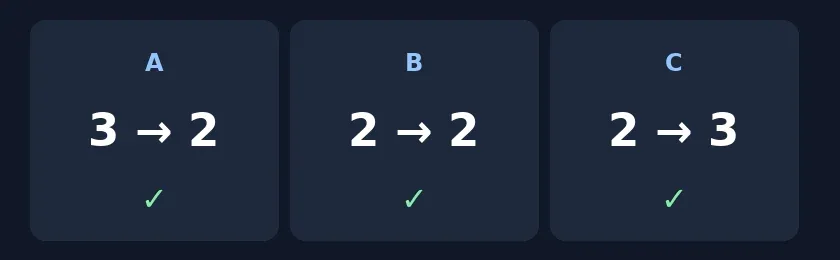
Original acceptance diagram, not a product test. The middle count staying the same is a correct duplicate rejection, not a stuck app.
For layout and button names, keep a wireframe or preview. For handoff, inspect the export without running it: find the state rules, sample data and dependency record, and ask for instructions to reproduce the three steps from the starting stock. Do not connect production or run unrecognized dependencies. If rules are buried, state disappears on reopening or only the author can explain the logic, treat it as a mockup. Pay for full builds only if the recipient can find rules and data independently and handoff saves time over starting with a simple prototype.
Content note:This article is based on publicly available information and is intended as a reference for evaluating tools. Features, pricing, and related policies may change at any time; please refer to the latest official information.
Original source:app0.ai