Choosing AppIconKitchen: does the wedge survive both icon masks?
Test an original three-shape icon in circle and rounded-square masks before switching export workflows.
AppIconKitchen’s terms list exports for iOS, Android including Adaptive Icons, and web. Exporting to several platforms can save packaging work, but adoption depends on whether the mark survives masking and the team can rebuild from the same master.
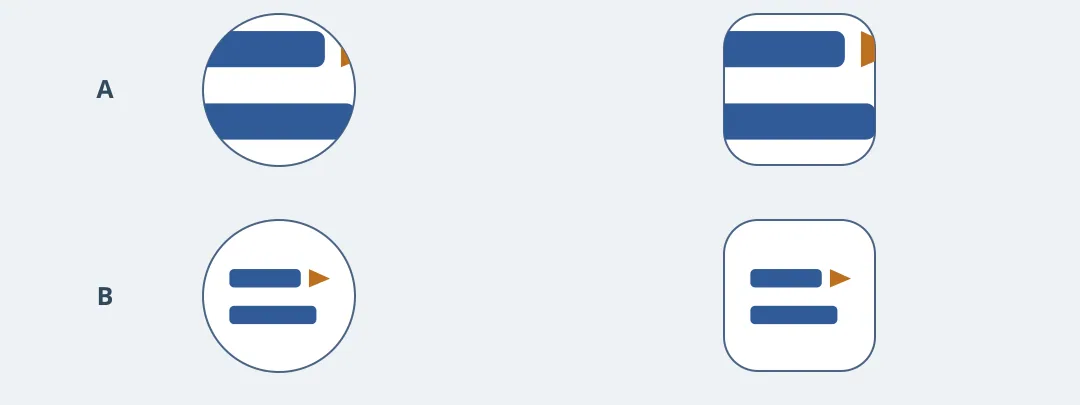
Figure 1. Look for the clipped wedge in the edge-heavy version, then check that the centered version preserves gaps between the three shapes. This is a drawn test example, not tool output.
Draw two separated blue bars and one small amber triangular wedge. Use only your own art and no third-party marks. Keep an editable master and make two copies, one with the mark near the edges and one with the group scaled down and centered. In a local preview, apply circle and rounded-square masks and shrink each to app-list size. Require an intact wedge, two readable bars and visible space around the mark.
For Android, check that the foreground and dedicated background can be edited separately, then preview them together. Inspect the iOS, Android and web assets your project actually needs locally, without signing in or deploying. Keep manual templates if a single master update already produces usable assets. Consider AppIconKitchen only if the export step saves time and a colleague can rebuild every needed version from an editable master. A flattened image alone won’t replace a workflow that needs separate layers.
Content note:This article is based on publicly available information and is intended as a reference for evaluating tools. Features, pricing, and related policies may change at any time; please refer to the latest official information.
Original source:www.appiconkitchen.com