AppLaunchFlow: can one workspace cut stale launch assets?
Check screenshots, listing copy and video versions before switching to an all-in-one workflow.
For one replacement screenshot, keep your current design file. Consider AppLaunchFlow when several assets repeatedly follow the same feature. The maker’s July 2026 post shows reusing raw screenshots for sets, listing copy and previews, with an editable layout and video storyboard. Reuse does not make the final assets consistent automatically. (Source)
Imagine a fictional puzzle app moving from v1 to v2: the timer becomes optional. S is the screenshots, M the listing text and V the preview video. S and M now match v2, but V still ends with “the timer starts immediately.” Check each finished asset against the feature fact sheet. That stale promise blocks the set. This is not a real app or store operation.
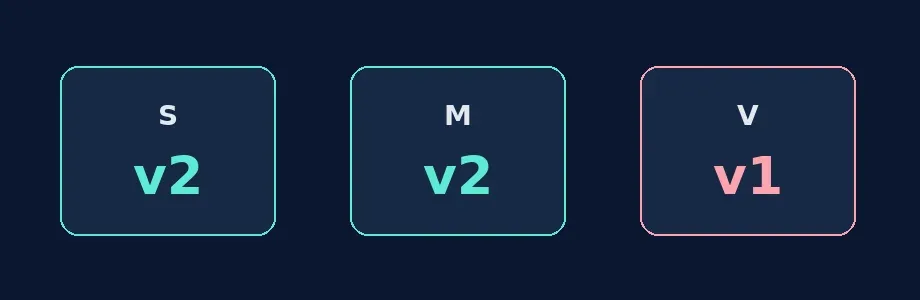
Original diagram, not tool output. Two current assets do not make the pack consistent.
Compare the workspace with your existing checklist. For the same original images, record each asset, source UI version, related copy and reviewer, then rehearse one rule change. Watch the actual video end frame, not just the filename. Review each locale for meaning; shared layout is not shared factual accuracy. Switch only if you miss fewer old claims and spend less total time editing and checking. Otherwise use your design tool and a simple table. Do not connect or publish to a store in this exercise.
Content note:This article is based on publicly available information and is intended as a reference for evaluating tools. Features, pricing, and related policies may change at any time; please refer to the latest official information.
Original source:dev.to