Arcads app videos: four seconds holding a phone is not proof of four seconds of use
Arcads Show Your App can turn an app screenshot into a presenter-led clip, but a convincing image does not mean the feature has run. Consider it for a stream of introduction assets; to prove an operation, retain an authorized real demonstration or show the interface directly.
If you already have an app screenshot and want a clip of someone holding up a phone to show it, Arcads Show Your App is a clear candidate. But its job is to introduce an interface, not prove that a feature has worked. Separating those tasks before buying helps you choose between a generated showcase, a still interface image and an authorized recording of a real operation by your team.
The official Show Your App guide describes a four-second, non-speaking route: prepare a clear app screenshot, choose a presenter from the relevant actor library, then generate the phone-showcase video. A separate speaking route first uses the screenshot as an image reference to generate a starting frame, then turns that image into video. Neither route means that uploading a picture makes the software operate your app. They work with visual material; the guide's conversion-benefit claims are not evidence of your own advertising results either.
Help viewers distinguish a presentation from an event
Imagine a wholly fictional booking app. Your own screen says “Request submitted, awaiting confirmation,” with a “View request” button. The introduction can describe the waiting state after submission, but it cannot say “Booking confirmed” or have a synthetic presenter claim “I used it to get a booking.” Those statements respectively change the product state and invent a usage experience. An AI label cannot turn either false claim into real evidence.
If the concept calls for someone pointing at a phone, first confirm usage rights for the chosen person and assets. Do not impersonate real customers, employees or public figures, or clone another person's face or voice. Clearly identify the synthetic presentation and avoid fabricated user testimonials. This article only discusses an original interface without personal information and a proposed acceptance check. The phones in the illustration are original diagrams, not Arcads output; no real person's likeness was generated or used.
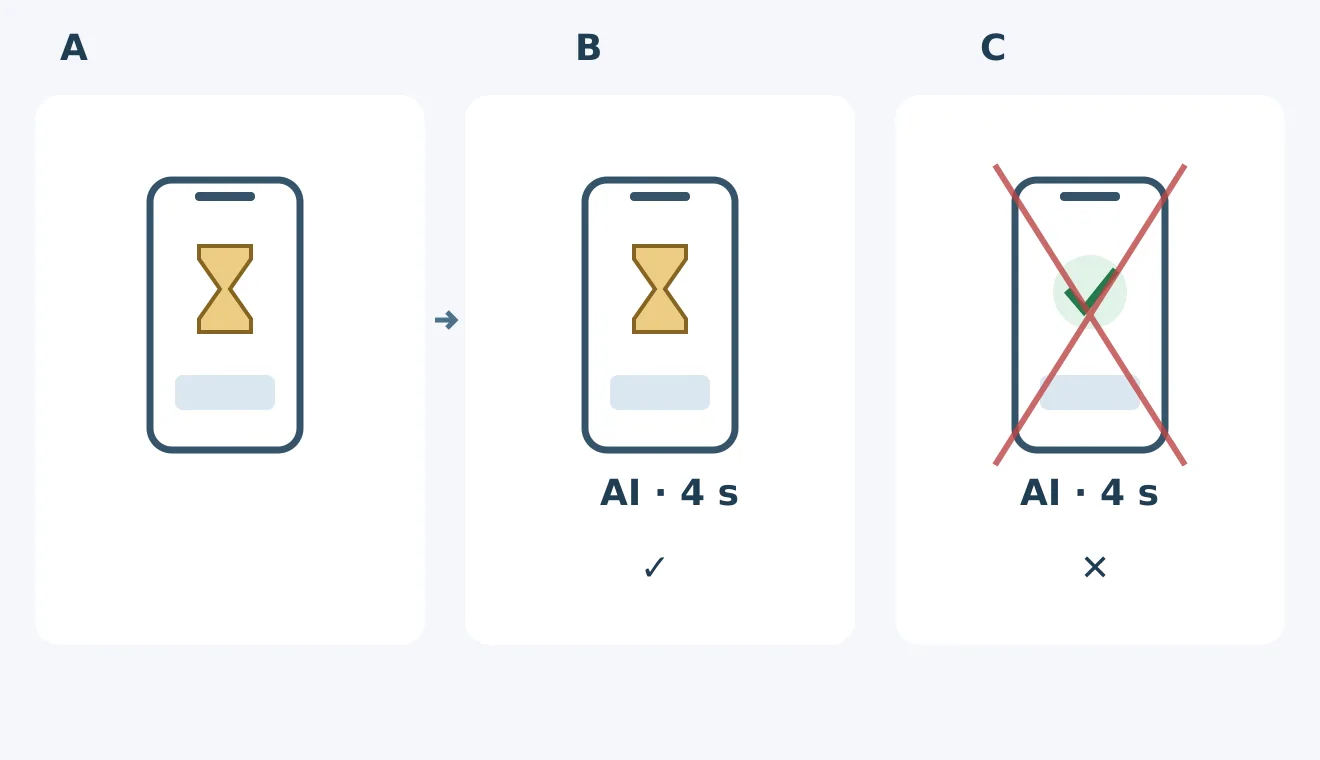
Original fictional interface, not Arcads output. The hourglass means awaiting confirmation and a check inside the phone means success. A is the original screen; B retains its state and identifies the AI presentation; C changes it to success without justification and should be rejected. A label identifies synthetic origin, not the truth of the product state.
Review the clip along its timeline. At the beginning, middle and end, is “Awaiting confirmation” still on screen? Has the button turned into “Booking confirmed”? Which essential details does a finger obscure? Is the state still readable at the actual placement size? If generated motion changes the interface's meaning, contradictory subtitles cannot rescue it. Use a simpler showcase shot, or pass the original still into your existing editing workflow. Faithfully conveying one state matters more here than elaborate movement.
Put the four-second clip back into the full ad
A single input screenshot cannot prove a state change after a click, much less that a real booking, payment or message has completed. If an ad must explain a sequence of operations, arrange a separate authorized functional demonstration with fictional data, and clearly distinguish that demonstration from the synthetic introduction. Do not edit generated button animation to look like a recording of actual use. When you only need to introduce one screen, the original image with a short explanation may be clearer than an actor clip.
Before buying, draft a small asset-acceptance checklist rather than immediately generating dozens of clips. Use the same self-made screenshot and checked introduction script to compare an edited version of the original image with a proposed generated showcase. For acceptance, viewers should correctly understand the waiting state, not mistake the presenter for a real user, and still follow the clip once it is inserted into an existing ad. There are no actual campaign or performance data here. These checks assess whether an asset is usable, not its predicted click-through rate.
Evaluate the quote per usable finished clip as well. Suppose you generate 6 candidates and only 2 pass the state, readability and synthetic-label checks. Use 2 as the output denominator and include all six generations, rework and editing costs. This is a budgeting assumption, not Arcads' pass rate. Check that your chosen plan covers the required features, duration and generation billing; a four-second guide example does not establish a fixed price. Adopt the workflow only if you regularly need compliant app-introduction assets and it reduces complete delivery cost compared with existing editing. If you need evidence of real use, or already have one clear screen, another generation layer is not necessary just to put someone on camera.
Content note:This article is based on publicly available information and is intended as a reference for evaluating tools. Features, pricing, and related policies may change at any time; please refer to the latest official information.
Original source:help.arcads.ai