Choosing Arcwise: is blue inventory 5, or is 9 the whole sheet?
Use three fictional rows to check the selected range, color filter and updated totals against a local formula.
Arcwise’s spreadsheet guide describes analyzing selected tabular cells and checking the range in Focused on. The right range doesn’t guarantee the right filter. Its privacy policy says ordinary spreadsheet content used by AI Analyst may be sent to Azure OpenAI, so do not treat the feature as local-only.
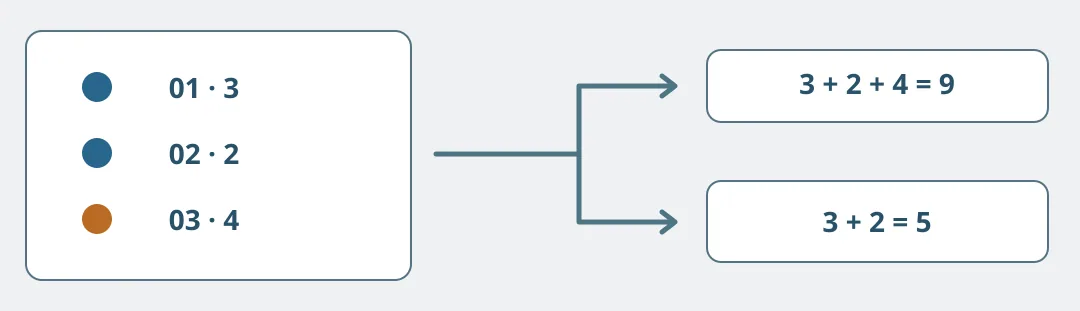
Figure 1. Both totals are arithmetically right, but answer different questions. Name the included rows before accepting either total.
On paper or in a local spreadsheet, write three fictional workshop inventory rows: 01 blue 3, 02 blue 2 and 03 orange 4. Define the range as those three rows with headers and separately state that only blue counts. Ask for the row IDs and quantities used. Accept 3+2=5 only if it includes 01 and 02 and leaves out 03. A result of 9 counts all stock as blue, even though the arithmetic itself is right.
Change the quantity on row 02 to 1. Check the range is unchanged and ask for the included rows and values again. Now blue totals 4 and all rows total 8. If the answer remains 5, check whether it used an old value or failed to trace the source. A local conditional sum or pivot table is usually easier to verify for a stable question. Consider Arcwise only if questions frequently change, colleagues can trace results to rows faster, and policy allows the data processing. No account or real sheet is needed for the exercise.
Content note:This article is based on publicly available information and is intended as a reference for evaluating tools. Features, pricing, and related policies may change at any time; please refer to the latest official information.
Original source:docs.arcwise.app