Choosing Argos CI: separate image jitter from a title that hits an icon
Use two controls on a fictional catalog card to decide whether screenshot diffs beat manual side-by-side review.
Argos CI’s engineering post describes how responsive images can shift across renders and produce false visual regressions. Its changelog describes a selector for screenshot comparison variants. A diff points to what changed; it does not decide whether that change blocks reading.
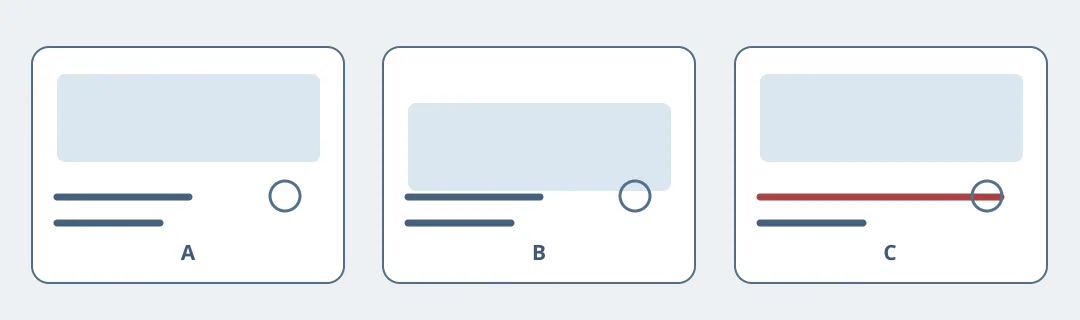
Figure 1. B represents one capture before the image settles. C still covers the icon after the illustration stabilizes. Don’t dismiss both changes together.
Use a catalog card you drew yourself, offline. Keep A as the approved baseline and hold font, text size and canvas size constant. In B, mimic an illustration shift during loading. In C, leave the image in place but extend the title into the icon on the right. Compare each twice. B should return to baseline after the image settles; if the shift persists, investigate it as a layout issue. C repeats in the stable state and must remain an issue to fix. Noise in B is not a reason to ignore the whole card.
Start with a manual contact sheet of all three versions. Record review time and whether anyone misses C. Keep manual comparison for a small, stable catalog. Consider Argos CI if repeated comparisons across many variants take time, you can separate transient captures from repeatable collisions, and a person still approves the baseline. Use offline assets only, without uploads or a live pipeline.
Content note:This article is based on publicly available information and is intended as a reference for evaluating tools. Features, pricing, and related policies may change at any time; please refer to the latest official information.
Original source:argos-ci.com