Choosing Artypa: the copy says two, but does the drawing show one?
Use a fictional equipment card to check whether text and artwork arrive on the same revision, then compare with your own SVG template.
Artypa’s maker presents copy and visual work as part of one creative suite. A shared workspace does not mean edits stay in sync automatically. Its privacy policy includes uploaded or generated files as content data, so do not treat it as a local-only tool.
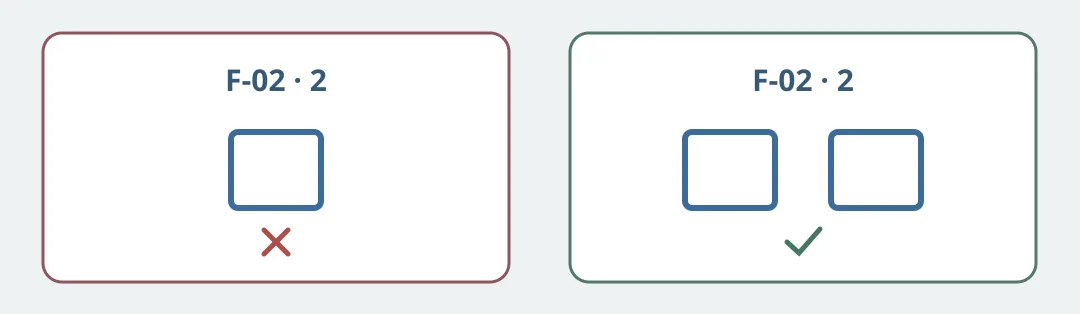
Figure 1. Both headings use the revised copy. The left still shows the old art; the right matches the number with two visible squares.
Make a fictional equipment card, F-02, on paper. In v1 the illustration has one blue outlined square. In v2 the copy says “two blue outlined squares” and the new drawing has two. Build two handoffs using v2 copy: pair one with the stale v1 art and one with the v2 art. Ask the next person to check the revision of both assets and then count the squares actually shown. The left fails even if it looks polished: the revisions must match and two squares must really be visible. The drawing is an editorial example, not Artypa output.
Run the same revision with editable text and an SVG template you drew. Count the time to edit, swap the illustration, verify and send the mismatch back. Keep the template for occasional cards if it is easier to maintain. Consider Artypa only if repeated copy and art revisions take less handoff time and the process catches the planted stale image. This exercise uses invented materials, no account or upload, and assumes no automatic sync.
Content note:This article is based on publicly available information and is intended as a reference for evaluating tools. Features, pricing, and related policies may change at any time; please refer to the latest official information.
Original source:www.artypa.com