Is Asana right for cross-team work? Separate one shared task from two acceptance checks
Asana multi-homing places the same task in different projects, reducing duplicate upkeep. It does not turn one completion state into two independent acceptances. A fictional poster handoff shows when to share a task, when to split the work and how to assess migration cost.
The biggest frustration in cross-team work may not be a missing board, but two lists describing the same job with nobody sure which record is authoritative. Asana's multi-homing addresses this duplicate upkeep: put the same task in different projects without creating another task. If each team actually needs to deliver and accept its own work, split the work before deciding what to share. Matching titles alone are not a reason to merge.
Asana's official annual report describes multi-homing as sharing tasks across projects or workflows without duplication, letting different teams view the same work. Its help documentation also says changes to assignee, due date, description and other details appear in the projects containing that task. These are different entry points to one record, not two copies trying to catch up, nor an approval system that gives each project an independent completion state.
One poster can represent one job or two
Consider a wholly fictional exhibition-preparation project. Both the design team and the events team want to track “Deliver final poster,” with exactly the same deliverable, owner and completion criterion: one approved file ready for subsequent use. Placing that task in both projects is useful. Both teams should open the same record, and changing its due date should not require notifying the maintainer of another copy.
But “Design file approved” and “Poster published” are not the same acceptance. The first can be finished while the second still awaits placement and a publication window. Forcing both into one shared task makes a completion check easy to mistake for publication that has not happened. Create two tasks with their own owners and completion conditions, connected by an explicit handoff. If both teams need visibility, share each relevant task separately. Merely copying the design task and renaming it is not a sound split.
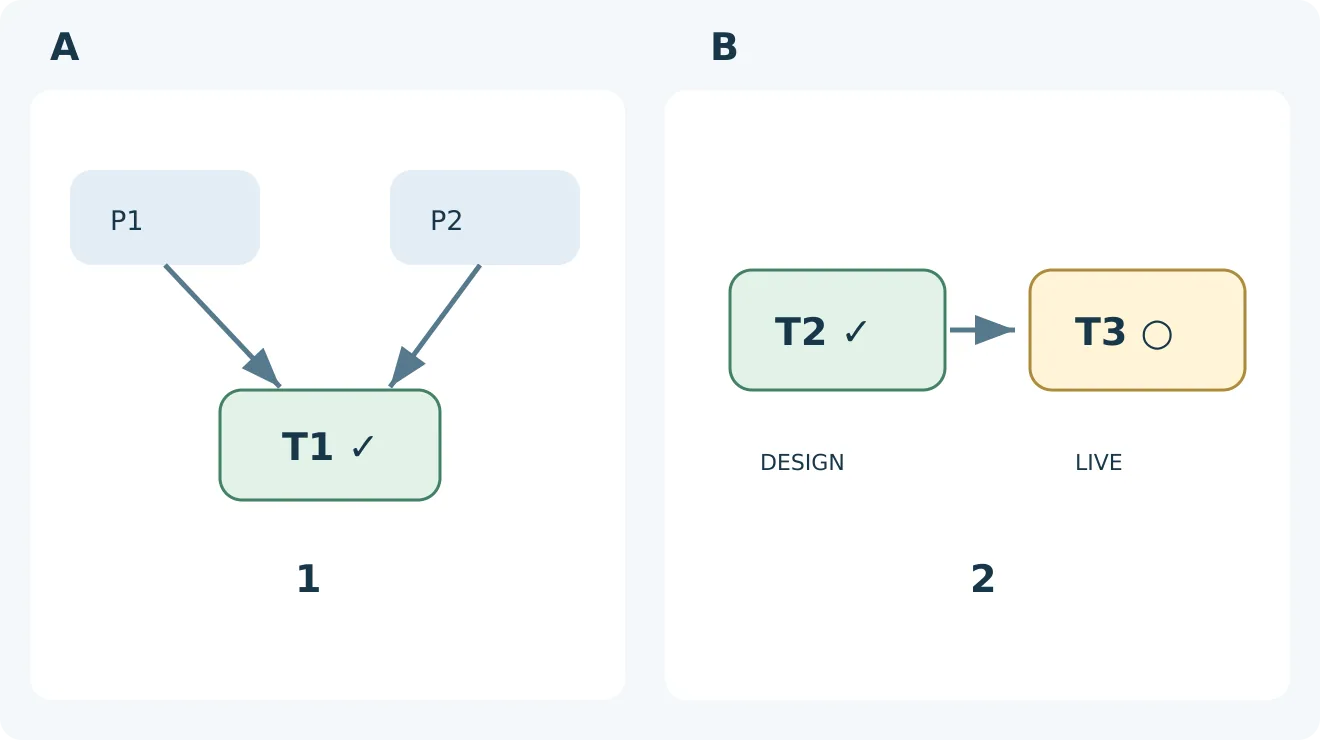
Original structural diagram, not an Asana interface or test result. In A, two projects connect to the same T1, counted as one deliverable. In B, T2 and T3 are distinct jobs; design’s check cannot replace publication’s pending circle. Define completion criteria before choosing sharing or splitting. DESIGN means design acceptance; LIVE means publication acceptance.
A selection demonstration can use just three self-made records, with no client files: one task both groups need to see but accept only once, plus two tasks for design followed by publication, accepted separately. For the first, open it from both projects, confirm that it is the same task, change a fictional due date and check the other entry point. For the other two, complete only design and verify that publication remains pending. These are proposed acceptance cases, not Asana tests performed for this article. No project was created and no real task changed.
Decide who should see what before reducing copies
Sharing a task also requires checking the receiving project's members and visibility. A description suitable for its original project is not automatically suitable after addition to another one. Use material without personal information in the demonstration, record which roles need to view, comment or edit, and have an authorized person inspect the actual settings. Do not broaden access just to make the trial pass. Nor should you assume that removing a task from one project revokes every existing access path.
The comparison need not start with another large platform. If the team only needs one shared checklist, an existing shared table with clear ownership may suffice. Compare the same deliverables: how many records must be maintained per change, who handles discrepancies, how completion differs from handoff, and how long newcomers take to learn. A task appearing in two projects does not count as two completed jobs. Before reporting, establish whether the unit is unique deliverables rather than list rows.
Asana's shared-task structure merits migration and training costs only when duplicate records regularly cause real rework and teams genuinely need their own project organization. Check the seats and features required in the quote. Track time spent cleaning up old tasks, maintaining rules and performing routine checks during the pilot; one fewer copy does not automatically mean half the cost. If the two teams have different acceptance criteria, or one existing list already suffices, clarifying task boundaries is more useful than adding a tool.
Content note:This article is based on publicly available information and is intended as a reference for evaluating tools. Features, pricing, and related policies may change at any time; please refer to the latest official information.
Original source:investors.asana.com