Is AskVideo.ai worth it for finding clips? Separate what is said from what is shown
Use a fictional tutorial to test speech, picture-only evidence and a later correction without sharing a link.
Finding a segment is not reading the frame
The April 2026 AskVideo.ai terms describe YouTube Q&A and transcription; the product page presents timestamped lookup. That may help find spoken lines in your own work. A transcript match does not prove visual understanding or the final answer.
Design three questions for your own clip
An imaginary display tutorial says “blue label” at 00:12, silently shows green at 00:20 and says to use green at 00:35. Ask what was first said, when it was corrected and what was shown without speech. Locate the first two and mark the visual answer unknown without visual evidence. Review the original locally or request a vendor demo. Do not upload files or share links.
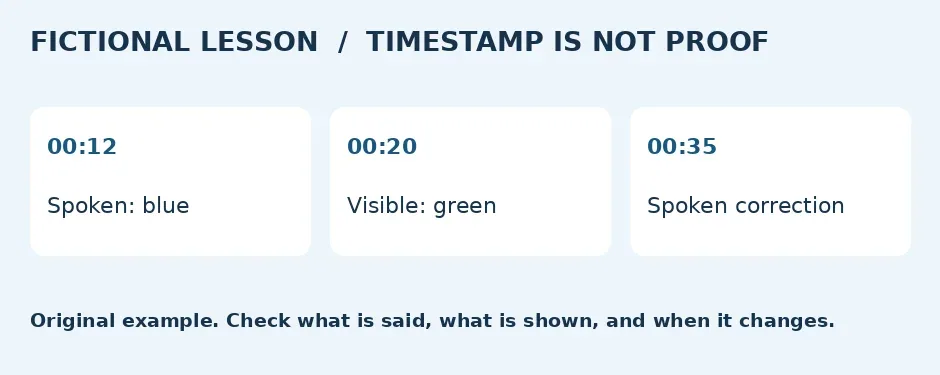
Original timeline, not a product test.
Require a human rewatch
Record time, spoken versus visible evidence and later corrections. The link should land at the cited part, not the opening. A right color at the wrong point fails. Verify plan length, transcript languages, retention and deletion. Do not assume handling of missing captions; exclude third-party material.
Compare chapter markers
For short clips with fixed questions, use local caption search or your own markers. For repeated long lookups, pay only if location is faster and evidence types stay distinct. If speech, pictures and corrections still get conflated, keep the manual log.
Content note:This article is based on publicly available information and is intended as a reference for evaluating tools. Features, pricing, and related policies may change at any time; please refer to the latest official information.
Original source:www.askvideo.ai