Choosing Attyn: check what changes and where the text is processed
Use a fictional exhibit label to test selection replacement and model routing separately before deciding whether Attyn saves window switching.
If much of your short-form editing on a Mac means copying text to a chat window and pasting the answer back, Attyn’s Inline Assist is worth evaluating: it brings rewriting to the cursor. The early release describes rewriting highlighted text in place. Verify in your own editors whether you can review before writing and keep replacing separate from sending; do not assume a particular button exists. For occasional work, manual editing or comparing drafts in an existing tool may make changes easier to see.
Check the edit with three markers
In a blank, unshared draft, write three invented exhibit-label lines: “A | Blue paper exhibit,” “B | Please place the paper card at this spot,” and “C | Label 07.” Select only B and ask for a shorter version that keeps the action and place. If a suggestion can be previewed without committing it, discard the first and check that all three lines remain intact. Request again from the same source and proceed only if you can review and explicitly confirm. Otherwise mark the test failed, without trying it in a real form or document. “Put the paper card here” passes; “Take the paper card away” fails even if shorter. A and C should still be unchanged after confirmation. Repeat with your second everyday editor; marketing is not proof of compatibility with every field or app. This is an acceptance plan, not actual test results.
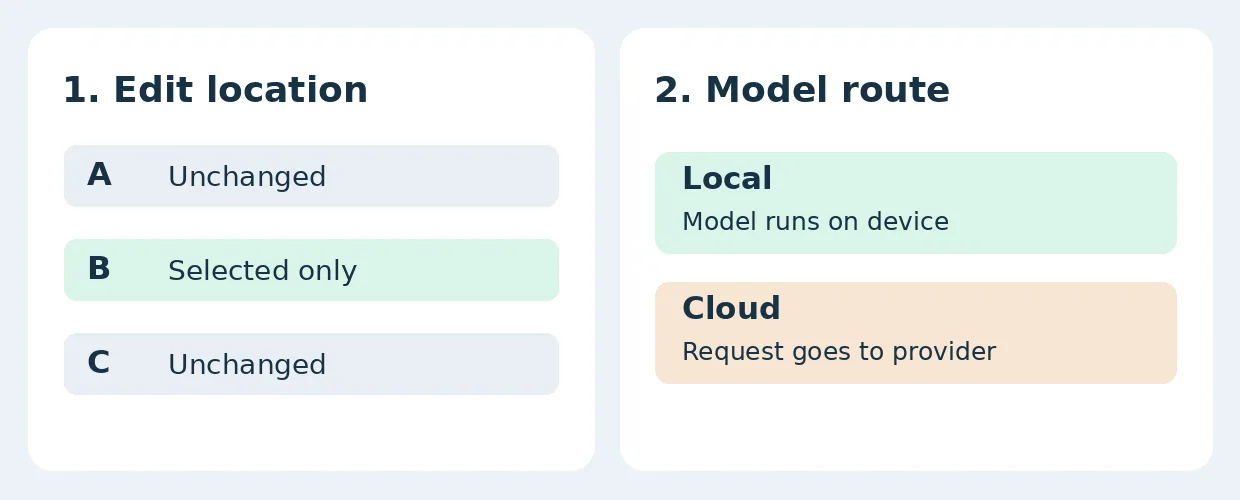
Original acceptance illustration, not a product screen or test result. B alone should change; where an edit appears is separate from where a model processes it.
In-place edits do not prove on-device processing
Attyn’s terms distinguish local models, models using your own provider credentials, and models accessed with Attyn credits. Its privacy policy says data needed for the request is transmitted to the relevant service when you choose a cloud model or credits. Working in the current window is not evidence that data stayed on the device. Check the selected route with synthetic text. If on-device processing is mandatory, only accept a model you can verify runs on your device and meets your organization’s conditions; check device compatibility, resources and organization-approved permissions. If uncertain, keep real sensitive material out. This test needs no connected accounts, real documents, screen reading or external actions.
Add rereading, correction and route checking to the rewrite time, then compare it with your original manual round trip. If using a cloud model, check billing, data-processing requirements and behavior in your actual editors. Adopt only if frequent short rewrites consistently save time, preserve scope and meet your routing requirements. Otherwise retain manual review or an already approved editor.
Content note:This article is based on publicly available information and is intended as a reference for evaluating tools. Features, pricing, and related policies may change at any time; please refer to the latest official information.
Original source:www.attyn.com