AutoSend buying guide: accepting an application does not mean its email was delivered
Separate the application status from the notification status in a fictional example. Check whether delivery and bounce events reduce troubleshooting and whether handling the same application event twice still produces only one receipt.
A user completes an application and your system needs to send one status receipt. If your team can see it was sent but cannot tell whether it was delivered or bounced, AutoSend’s notification events offer evidence for troubleshooting. They do not decide whether the application was accepted or how many notifications one status change should produce. If your existing service already lets you trace delivery and failure by message, first check whether switching would help.
Keep the application and its notification in separate records
AutoSend’s official product information lists email.sent, email.delivered and email.bounced as separate events. Its delivery notification example includes a message ID and a time. Use fictional application AX-17 for a paper evaluation. It moves from “pending” to “accepted,” so the business record shows one change. If an internal retry presents the same change twice, it should still create only one acceptance receipt. Identifying the second instance as a duplicate is your application’s job, not an automatic deduplication guarantee from AutoSend.
Make two alternative records instead of sending real mail. With only a sent event, mark delivery “not yet confirmed.” If the same message ID later has a delivery event, record that evidence but do not write “recipient read it.” In the other record, a bounce follows sent. Mark the notification “bounce to investigate,” while AX-17 remains accepted. Now copy the delivery record once. The copy can only update the notification record for that email; it must not trigger a second receipt. Compare the entries by message ID and time to distinguish business changes, notification evidence and duplicate data. This exercise uses fictional records only and requires no service connection, recipient address or email send.
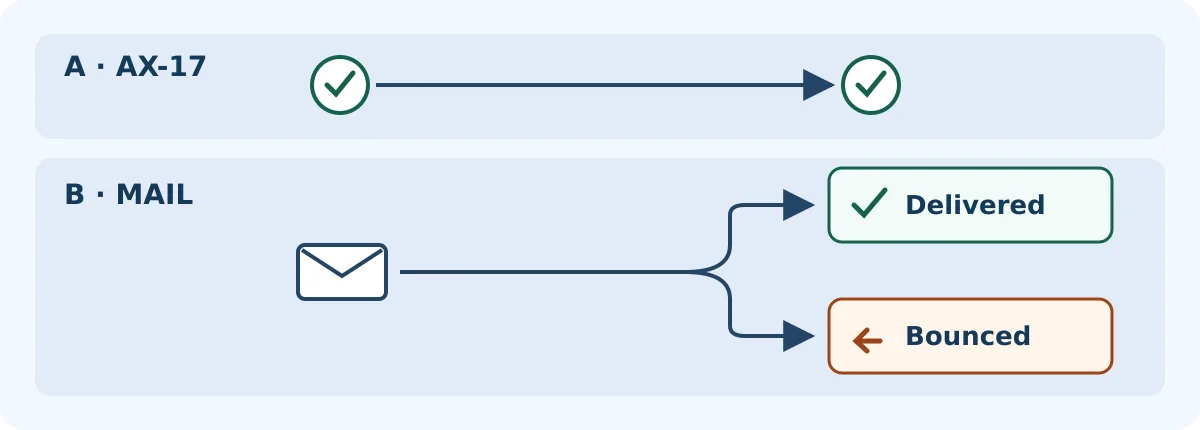
One application, two status lanes. Delivery does not mean read; a bounce does not change the accepted application back to pending. This is a paper example, not an AutoSend screen or test result.
Before choosing, compare both records with what your current service offers. Who can locate the same email, who handles a bounce, and might support staff mistake “no record found” for “not delivered”? Allow time for integrating events, maintaining records and handing off investigations. Official product information shows that not every plan offers event integration; check whether the plan you are considering covers the events you need. If the current service already provides those records, fix the duplicate on the application side first. Switch to AutoSend only if you lack traceable delivery and bounce evidence and your team can maintain the two separate states.
Content note:This article is based on publicly available information and is intended as a reference for evaluating tools. Features, pricing, and related policies may change at any time; please refer to the latest official information.
Original source:autosend.com