BGChanger guide: will the ring’s center still show the new background?
Check transparency against light and dark with an original geometric ring. Inspect the hole, edge and marker before choosing an output.
BGChanger is worth comparing when all you have is a short clip with its background baked in and the recipient needs to change that background repeatedly. If the destination uses only one color, or you still have the ring as its own vector layer with its motion, editing the source often avoids cleanup. Solid color and transparency serve different handoffs.
Check the same ring on a light and a dark background
The developer’s September 2, 2026 launch note describes removing the original video background and providing a transparent or solid-color result. These are two different uses. It does not show that every recipient’s editor reads the transparency channel or that a small hole will survive every frame.
Draw an original teal ring with an orange marker at the right. Sketch three frames: centered, moving right and returning. At each frame, ask what shows through the hole on both light and dark backgrounds, whether the marker is still there, and whether the outer edge carries traces of the old color. If the hole looks fine on a light background but is still filled with that light color on a dark one, the file is not transparent there. Three frames locate the checks; also require that the edge not flicker during motion. The paper exercise does not upload, play or generate video.
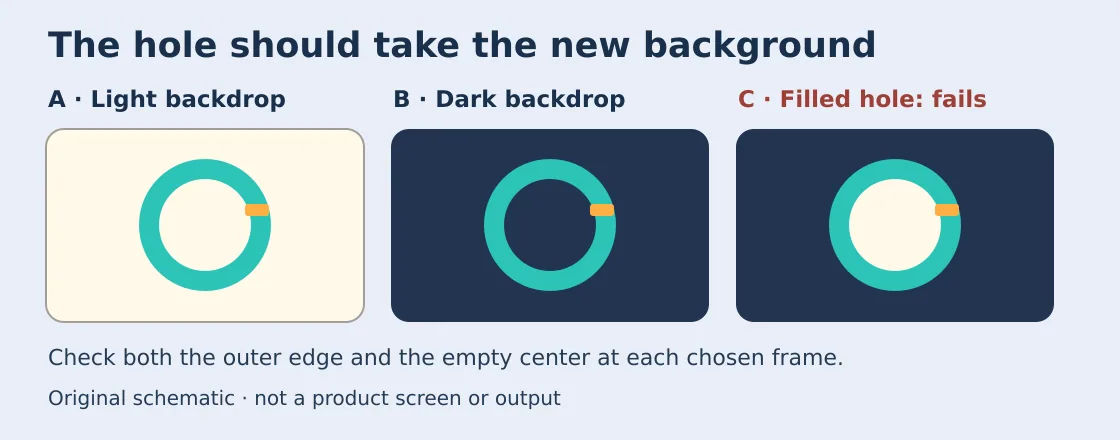
Original geometry, not a product screen or output. Check the outer edge, center and orange marker on both backgrounds.
For changing backgrounds, have the recipient check in their own editing environment that the hole reveals the new color and playing or resaving does not fill it with black or the old background. For a fixed color, check the color and edge readability without converting for transparency. Count removal, edge repair and cleanup by the recipient. If you still have the original layer or the editor cannot keep transparency, prefer the source layer or a solid version the recipient can review.
Content note:This article is based on publicly available information and is intended as a reference for evaluating tools. Features, pricing, and related policies may change at any time; please refer to the latest official information.
Original source:web.similarlabs.com