Bleepify buying guide: Make sure a censor beep leaves the sound you want to keep
Use an original timeline to review word matches, captions and background sound before choosing automated screening or manual editing.
If you regularly edit long videos you made for public playback, finding every word takes longer than fixing one known spot. Bleepify’s July 2026 detector guide introduces a timed transcript with suspected matches for review. The creator’s article updated before September 12 also notes that lowering the original audio over a word may lower background sound on the same track. Treat matches as editing candidates, not as approval by the venue.
Draw a fictional ten-second timeline without recording anyone, generating audio or uploading. At 3.2–3.7 seconds, “blue tag” is the test target; a bell at 3.8 must stay. A second “blue tag” appears only in captions at 6 seconds. The target should be unintelligible and the bell intact. Review captions separately so you do not count a caption-only word as a missed spoken match. If both sounds overlap on one track and cannot be separated, prefer re-editing original separate tracks.
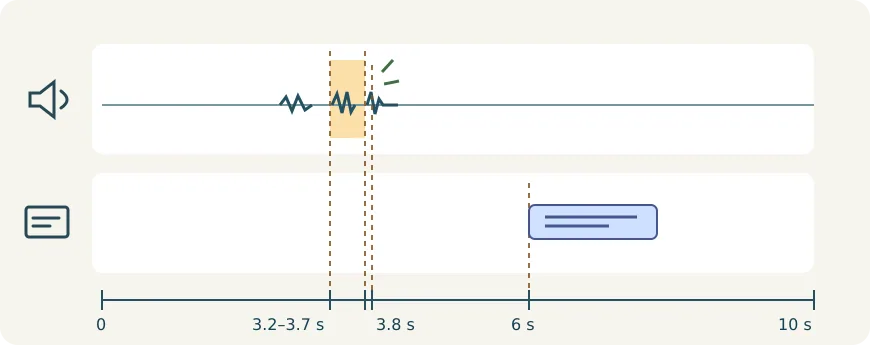
For a short clip with one known spot, manual editing and a listen-through in your existing editor are usually faster. For longer material compare time spent locating, revising and exporting again, plus per-minute costs. Check whether the required video and caption formats can be exported separately and whether the material may be shared with the service. Adopt only if both the render and captions pass and editing time really drops.
Content note:This article is based on publicly available information and is intended as a reference for evaluating tools. Features, pricing, and related policies may change at any time; please refer to the latest official information.
Original source:bleepify.me