Choosing Blender Agent Bridge: a correct front view still needs a side check
Draw your own block and platform. A preview is not acceptance, and an identical front outline does not prove the depth position is correct.
Having a preview does not prove an edit is correct
The v0.5.6 Blender Agent Bridge documentation distinguishes reversible helper previews from direct script operations and lists visual evidence such as viewport and render views. That gives teams another review step, not the same preview for every edit or a guarantee that one image proves the scene is right. Are you trying to replace repetitive edits or verify a spatial condition that is hard to describe? If the former takes only a few manual actions, a new review step may not help.
Use two synthetic views to check one block’s depth position
On grid paper, draw a platform four squares wide and four deep. Put a block two squares wide and two deep on it. The requirement is to center the block left to right and front to back, leaving one square on every side. In A it stays centered. In B it moves one square back without moving sideways. Both look alike from the front. From the side, A leaves one square in front and one behind; B leaves two in front and none behind. These are grid examples, not extension output or Blender screenshots.
Give another reviewer both orthographic views at the same scale and the requirement. They should identify A as passing and explain why B fails. If only the front view remains, the verdict is “not enough evidence for depth placement,” not an assumed pass for B. Use the side view before choosing. A pleasing perspective drawing is not a dimensional record.
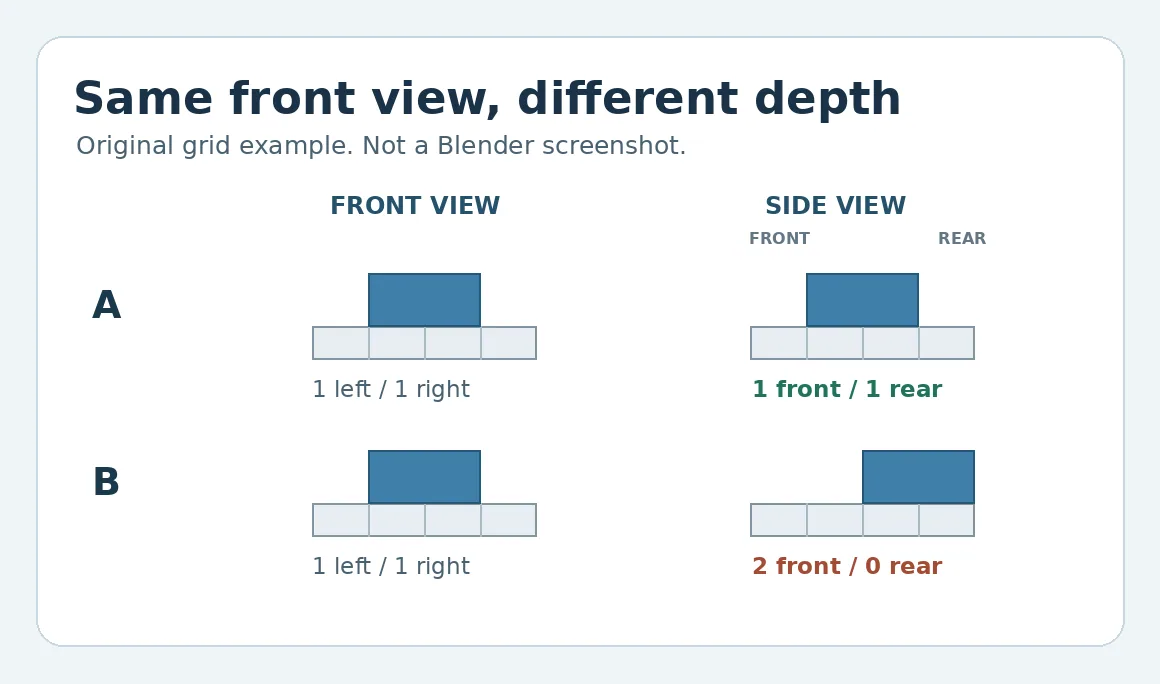
Original grid drawing, not a product screenshot. A front view alone cannot confirm depth placement.
When collaborative preview is worth considering
If small edits are frequent and reviewers must compare angles and explain why to keep or return a change, use these paper samples to compare manual image records with a preview workflow. Count the time to prepare views at a common scale, recheck after reverting and explain the handover. For occasional manual geometry changes, ordinary views and a separate handwritten record may suffice. If a candidate workflow cannot deliver the views needed to review or relies on capabilities unsuitable for the team, keep the manual process. This example installs nothing, grants no access, runs no agent and opens no real scene.
Content note:This article is based on publicly available information and is intended as a reference for evaluating tools. Features, pricing, and related policies may change at any time; please refer to the latest official information.
Original source:github.com