BrandBird buying guide: Reuse launch graphics without cropping the crucial annotation
Use an invented interface in wide and square layouts to see whether templates save more time than they cost.
When every release needs matching graphics, BrandBird templates can reduce repetitive setup. Its 2021 help article describes saving a layout as a template, and its 2024 guide describes annotating and exporting screenshots. The question is whether one style is reusable, not whether a template automatically fits every placement.
Draw an original interface and put copies in two paper frames without capturing or uploading a screen. Imagine a new control at the top right with an arrow beside it. Shrink the wide and square layouts to their intended sizes. Does the arrow still point at the same control, and is the label legible? If square cuts it off, reposition it separately rather than trusting a centered crop. If changing the image breaks the arrow, recheck the annotation.
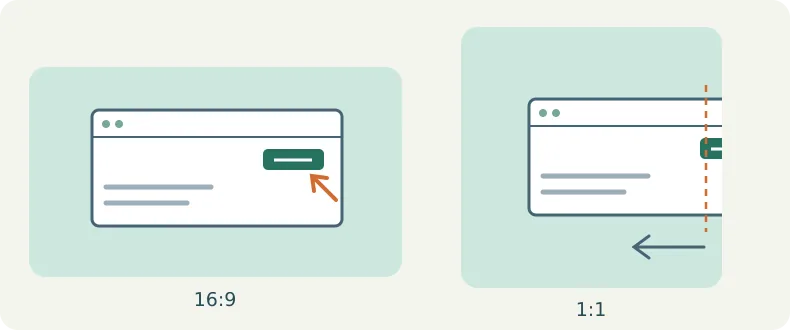
For an occasional image, the editor you already use may be faster. For weekly sets, compare repositioning, checks and rework. Confirm required sizes, exports and template permissions; real interface material must be authorized and omit unreleased information. Adopt only if reuse saves time without losing the key cue.
Content note:This article is based on publicly available information and is intended as a reference for evaluating tools. Features, pricing, and related policies may change at any time; please refer to the latest official information.
Original source:help.brandbird.app