BrickCenter buying guide: can you spot the notch in a brick concept image?
Use an original desktop design to check the front notch and the order of two colors. The deliverable is a visual direction, not a buildable model or parts list.
Consider BrickCenter if the design team only needs to settle the outline, negative space and colors. If it needs separate layers, a parts list or a build file, do not use a brick-textured image as the final deliverable.
Use the same original front-view sketch to check the idea
BrickCenter’s creator page describes making images of brick models from text. Its 2024 launch also presented it as a creative tool. That supports considering it for concept art. Looking like bricks does not mean the image has editable structure, and the image is not enough to verify quantities. (BrickCenter creation guide; BrickCenter team launch)
On paper, design a small desktop marker with a notch at the upper left of a navy outline and light blue above off-white at the lower right. Give someone who hasn’t read the brief two drawings: A keeps the notch and colors; B fills the notch and swaps the colors. Ask them to identify the notch and color order within five seconds. If they can’t, clarify the front view and color placement before adding texture or lighting.
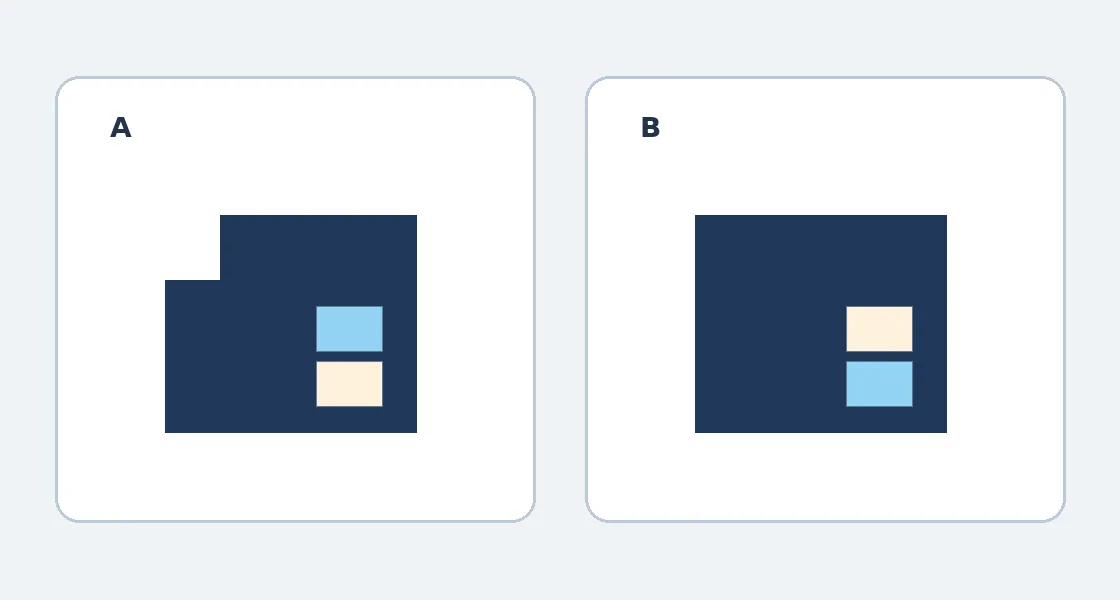
Original paper illustration, not a product screenshot. A keeps both requirements. B looks tidy but obscures the outline and color order.
When a subscription isn’t worth it
Use the same brief to compare generation, selection and manual correction time with drawing a geometric sketch directly. Continue only if you regularly need several concepts and may save rework. For one simple silhouette, your current drawing tool is enough. Check cost against the actual plan, usable images and corrections.
The original illustration shows only how to review the front view. No product image was generated, tool tested, parts purchased or model built. If the next team needs a parts list or model, choose a workflow that can deliver a structural file.
Content note:This article is based on publicly available information and is intended as a reference for evaluating tools. Features, pricing, and related policies may change at any time; please refer to the latest official information.
Original source:www.brickcenter.net