BrickForgerAI buying guide: does the LDR handoff preserve a side marker?
Check a marker hidden from the front in an original paper model. Distinguish a polished preview, a digital handoff and actual buildability.
If the next team must review the digital brick model itself, BrickForgerAI is worth comparing with tools that only deliver a render. For a color proposal that no one needs to open as a model, skip the 3D handoff.
Check the same marker in two paper views
BrickForgerAI's September 3, 2026 terms describe turning text into .ldr models, with a parts list and PDF guide, without guaranteeing every output is buildable or correct. Its workflow page describes making the model from selected brick shapes. These are statements about deliverables, not test results. (BrickForgerAI terms (2026-09-03); How BrickForgerAI works)
Sketch an original two-tier stepped desk marker, unmarked on the front and with one blue marker on the lower right side. The front alone cannot distinguish a missing marker from a hidden one. Write “right side, lower level, blue, one” on the handoff sheet. Ask the reviewer whether the model identifies that face, the parts list matches color and count, and the PDF identifies a relevant view or step. Do not sign off from the preview if the location or count does not match.
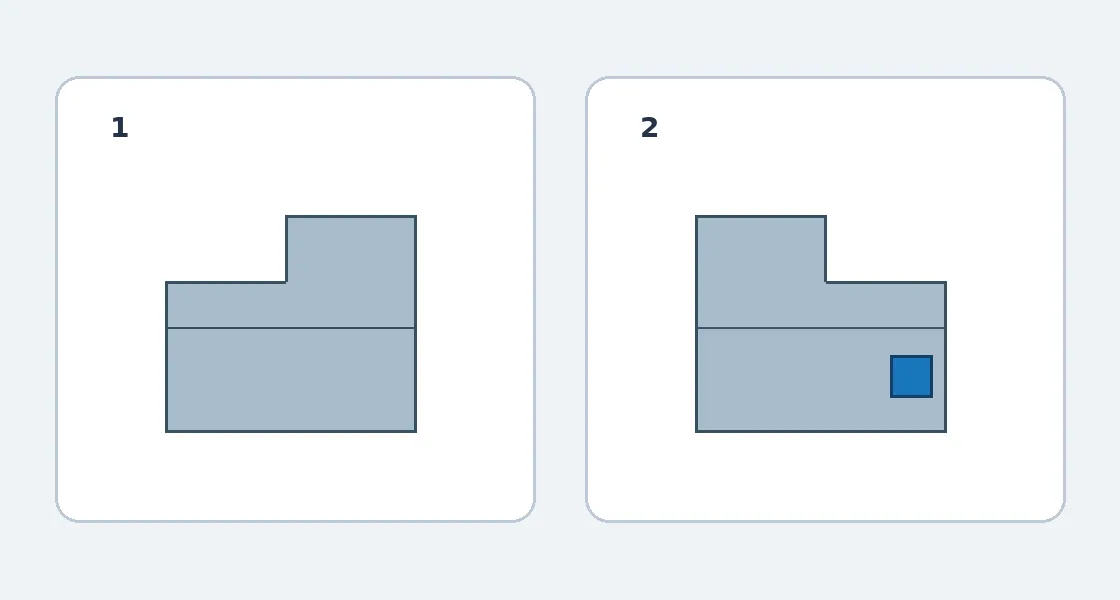
Original handoff illustration, not a product screenshot. Both views show one sample; not seeing it from the front does not make it absent on the right.
Evaluate reviewability and cost separately
Check whether the receiving tool can open .ldr, whether conversion is needed, and who handles fixes. Budget for repeat generations, manual cleanup and conversion; verify the applicable plan's price and allowances. For one small silhouette, draw front and side views yourself. If review is mandatory and conversion loses information, retain your existing digital workflow.
The original illustration explains paper views and the marker. It is not a product screenshot, structural check or building guide. No tool was run and no parts or physical objects were made or bought.
Content note:This article is based on publicly available information and is intended as a reference for evaluating tools. Features, pricing, and related policies may change at any time; please refer to the latest official information.
Original source:brickforgerai.com