Choosing Browse AI: Do different screenshots mean the wording changed?
Use two pairs of handmade page cards to assess whether Browse AI’s screenshot comparisons support your conclusion without mistaking wrapping for an edit.
If you need to check whether the text of your own notice changed, judge Browse AI by what two screenshots establish, not merely whether a change is flagged. The vendor’s March 2025 documentation describes reviewing differences between two captures. A different image is not proof of a text edit: the viewport, line wrapping, or an obstruction can also change what you see.
Make two pairs of static notices by hand. A reads ‘Closed on Friday’ before and after, with the second card taking two lines. B reads ‘Closed on Friday’ first and ‘Closed on Saturday’ second. Show someone the date area side by side and ask which pair proves a change in wording. Only B should count. If either card hides the date, mark it ‘Not fully visible’ rather than guessing. This is a paper exercise with no page retrieval, execution, or account.
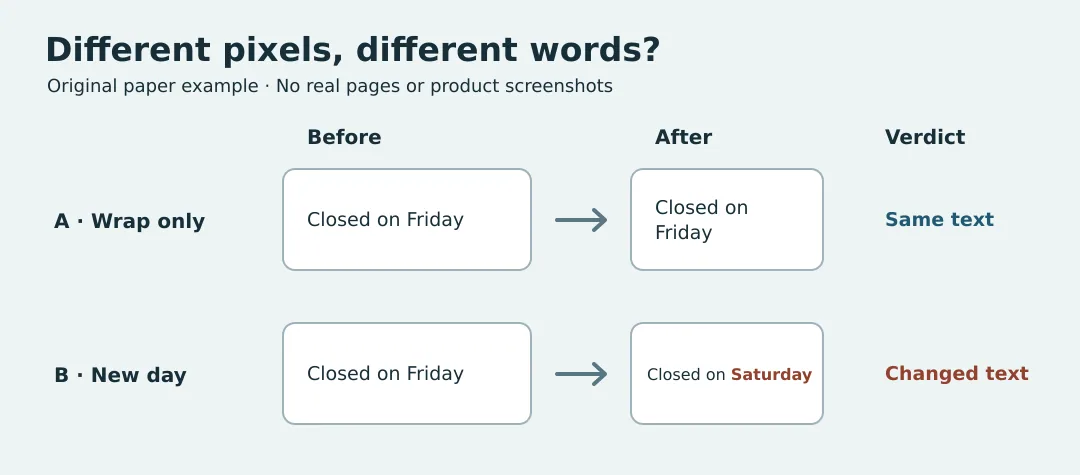
If you can access your own draft history, comparing the two versions as text is usually clearer. Consider screenshot records such as those in Browse AI only when layout is part of the deliverable and a person often needs to examine layout and wording together. A useful review must cover the same area, show the key line, and leave uncertain changes for a person to resolve.
Content note:This article is based on publicly available information and is intended as a reference for evaluating tools. Features, pricing, and related policies may change at any time; please refer to the latest official information.
Original source:help.browse.ai