BugShot guide: Which two images help hand off a clipped label?
Use two original interface mockups on paper. One shows where the text is cut off; the other shows the target, not that a fix shipped.
Separate a handoff from proof of a fix
BugShot’s July 2026 Product Hunt launch introduced interface capture and issue reporting. In the launch discussion, the developer explained that before-and-after visuals convey an intended change to developers and that a preview does not modify the site’s actual styles. The appeal is pairing a capture, annotation, and report to reduce back-and-forth over what was clipped. A good-looking preview does not show that the fix has shipped.
Draw observed and expected versions of one fictional card
Draw two equally wide versions of an exhibition wayfinding card on paper. Label the left “Observation”: the right edge cuts the final character of 入口方向 (“entrance direction”), leaving only 入口方 visible. An annotation points to the clipped edge. Label the right “Expected”: all four characters can be read. Both are original static illustrations, not page screenshots or instructions for changing a live site.
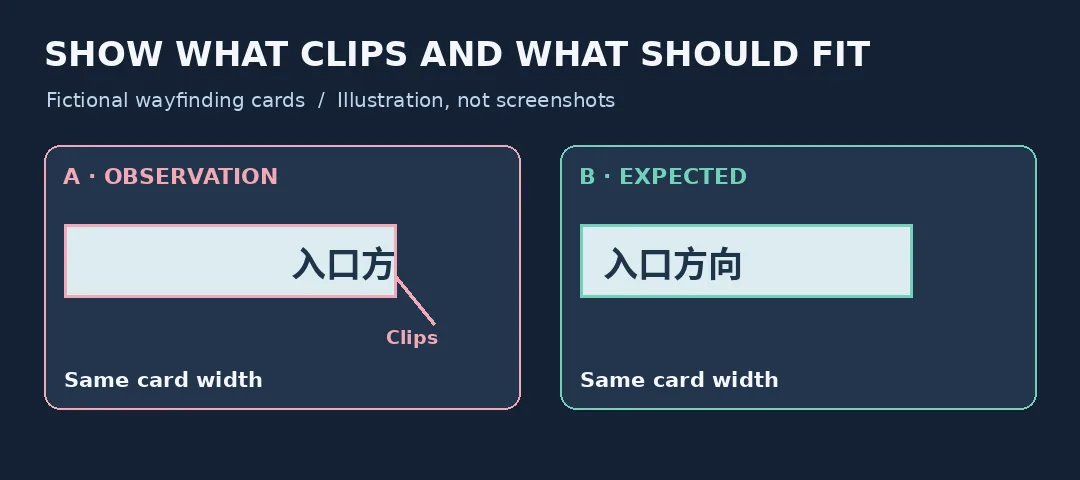
The observation shows what is missing. The expectation shows what should be visible. Original static illustrations, not BugShot screenshots or evidence of a fix.
Can the next reader spot the problem without guessing?
Treat both drawings as handoff attachments. Someone who hasn’t seen the design should identify the card, the label, and exactly what’s missing, and recognize that the right panel is only the goal. A crop of 入口方 alone may not identify the label; the full right panel alone doesn’t show the problem. “The complete label should fit on a card of the same width” is enough. Don’t guess the cause or treat an illustration as proof of repair. This was a paper exercise, not a BugShot test: nothing was installed or connected, and no real data was captured or submitted.
When BugShot is unnecessary
If the team often needs extra screenshots to explain a visual problem and wants the location and target in one report, BugShot’s approach is worth evaluating. For a one-off static handoff, annotate the two images manually and give one acceptance criterion. If the handoff cannot include extra visuals or context, decide what you are permitted to share first instead of assuming the whole capture is appropriate.
Content note:This article is based on publicly available information and is intended as a reference for evaluating tools. Features, pricing, and related policies may change at any time; please refer to the latest official information.
Original source:www.producthunt.com