Bulbthings buying guide: Does a matching tag pass inventory?
Use three fictional exhibit-prop cards to distinguish finding the record, confirming the location and needing to verify identity.
A scan finds the record; it does not confirm the location
Bulbthings’ iOS listing separates quick inventory, which uses asset tags to find or update details, from search, which can display the recorded status or location. Its version history also lists inventory and scanner improvements. This may save a small team with multiple storage locations from copying identifiers by hand, but a record match does not confirm the physical location. A partial tag does not justify selecting a similar asset in search. The exercise assumes no particular plan includes every feature.
Check three outcomes on paper
Invent two folding stands, E01 and E02, that look identical, and a lampshade prop with an intentionally incomplete tag, E0?. A fictional ledger lists E01, E02 and E03 under Cabinet A. For the simulated physical check, place E01 at Cabinet A and E02 at Cabinet B. Mark the third location unconfirmed rather than guessing from the prop. Paper cards stand in for scans; no app, upload or ledger change is involved.
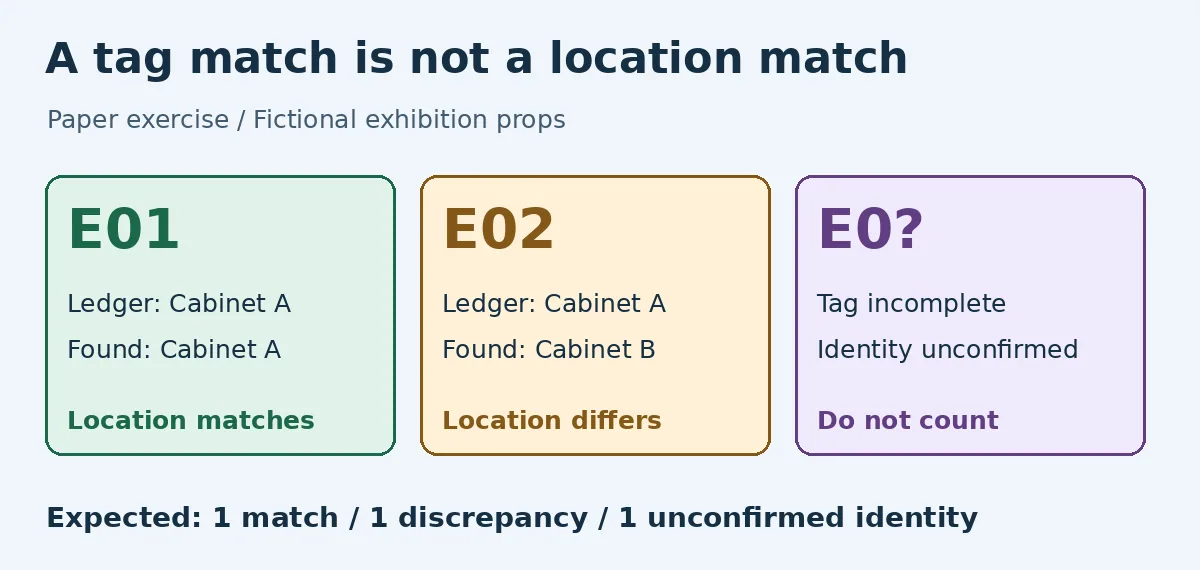
Original paper illustration, not a Bulbthings screenshot or test. The outcomes are location match, discrepancy and unconfirmed identity.
Ask a second reader for three verdicts. E01 matches location and record. E02 is the correct asset but the location differs: list the exception without counting a match or overwriting the ledger. The partial tag cannot be filled in as E03 or counted in any cabinet’s verified inventory. The result is one match, one location discrepancy and one unconfirmed identity. Two matches means a tag lookup was counted as an inventory pass.
When a paper ledger is enough
If similar props often move between locations, ask whether your chosen Bulbthings plan distinguishes locating a record from verifying a location and can keep exceptions without overwriting the original entry. Count relabeling and human review time as well. If you have few items with clear unique IDs and rarely move them, add “location discrepancy” and “identity to verify” columns to a simple ledger instead of changing tools just for scanning.
Content note:This article is based on publicly available information and is intended as a reference for evaluating tools. Features, pricing, and related policies may change at any time; please refer to the latest official information.
Original source:apps.apple.com