CAMB.AI buying guide: Align subtitles first without producing a dub
Two original caption cues test timing, translation and standalone delivery without recording or generating voices.
Multilingual displays do not always need a dub. CAMB.AI’s May 2026 subtitle guidance distinguishes timecodes, source and target-language captions and dubbing, and documents subtitle mode and downloads. Evaluate the captions against your existing edit. Sync does not mean the translation passed review or a voice has been licensed.
Sketch two original scenes without people, recording, generation or upload. From 00:01 to 00:03 a blue mark means start. From 00:03 to 00:06 a yellow mark means exit. On paper check that the second cue does not precede the image change and that exit was not translated as entrance. Check timecodes, translation and cue breaks. A colleague should reconstruct the intended result from captions and shot notes alone.
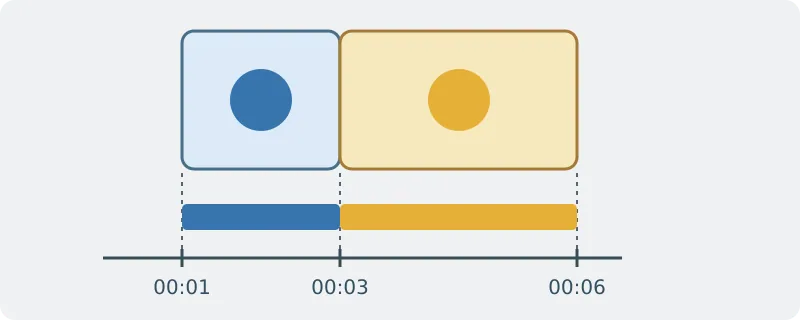
For two cues, your editor and a bilingual check may be faster. For many cues and languages compare transcription, translation, correction and cost. Check separate SRT export for each required language, price captions apart from dubbing and rights to process the source. Do not introduce voice imitation or audio needing extra permission for subtitle-only work.
Content note:This article is based on publicly available information and is intended as a reference for evaluating tools. Features, pricing, and related policies may change at any time; please refer to the latest official information.
Original source:help.camb.ai