CapCut buying guide: same endpoints, but does the shot hold in between?
Use three original geometric frames on paper to distinguish holding from moving, then decide whether you need a timeline with position keyframes.
If you're editing existing, self-made clips and need to specify when an object arrives and how long it holds, compare the desktop timeline in CapCut. For two static states, use your current drawing tool. This guide is about editing existing material, not generating video from a prompt or accepting a cut just because it was generated.
Use three paper time points to distinguish a hold from a slide
CapCut's desktop keyframe guide describes controlling properties like position and scale on a timeline. Keyframes give editors a way to express a timing requirement. Documentation doesn't prove your own rhythm will be right, and a preview doesn't replace checking the deliverable.
Imagine a three-second geometric demo for an internal guide. There is one square and a divider. The square starts on the left and ends on the right. In A it is still left at 1 second, leaving a second to read the starting state. In B it is already sliding right at 1 second. Start and end match. Ask a reviewer who hasn't seen the brief to identify the hold and note which frame reveals the early move. The endpoints pass in both cases. If the square has left the left anchor at 1 second, reject the one-second hold.
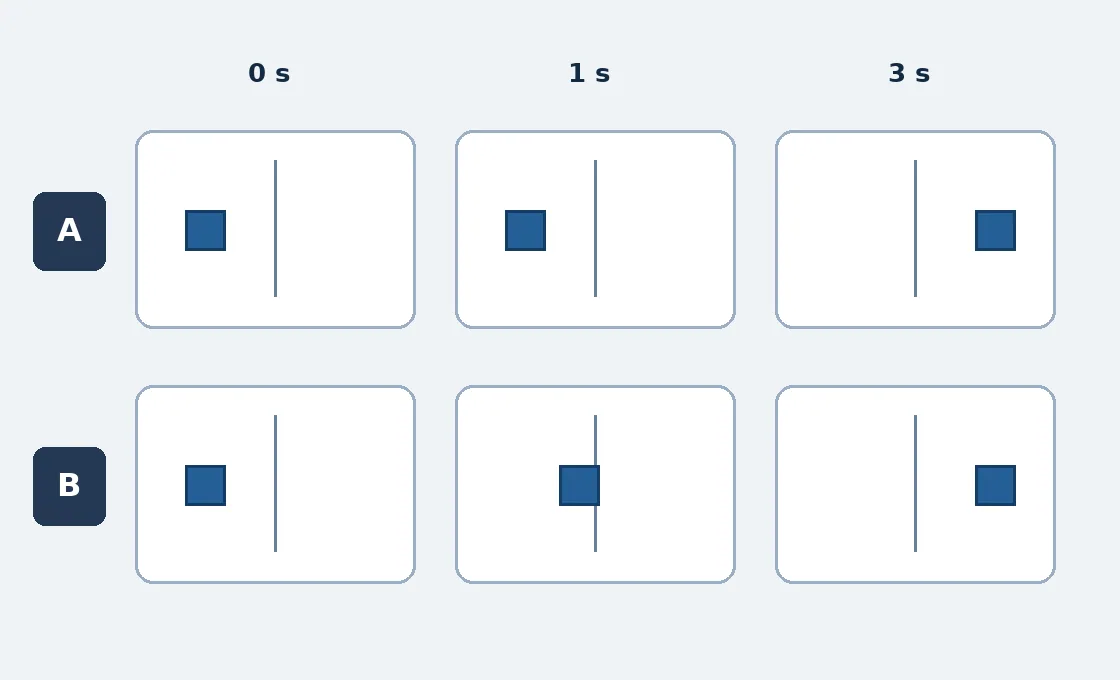
Original paper timing diagram, not a product interface. A and B have the same endpoints, but only A keeps the first state for a full second.
When to stay with a static storyboard
If that hold changes often, compare position keyframes, whether another editor can open the editable project, and whether you can recheck time points in the export. Account for handoff, rework and review, not just downloading software. Verify the desktop version and access on your actual plan. If timing doesn't matter, use three static storyboard panels instead.
These are original paper diagrams, not a screenshot or project. No software was installed or run, media uploaded, accounts connected or video published.
Content note:This article is based on publicly available information and is intended as a reference for evaluating tools. Features, pricing, and related policies may change at any time; please refer to the latest official information.
Original source:www.capcut.com