CaptionBolt buying guide: Keep visual clues and captions when going vertical
Use a fictional geometric storyboard to compare a center crop with full width and check whether clues and two caption lines remain visible.
Correct captions do not make a clip work in portrait
CaptionBolt puts caption styling and video resizing into one finishing workflow. Its September 7, 2026 notes describe retaining more source detail when switching orientation with a solid or blurred background. If your team makes horizontal and vertical variants, check whether the finished frame retains the visual clues and whether captions cover them. More retained detail is not a promise of automatic composition for every shot.
Change the frame, not the content
Draw a fictional wide frame with a blue triangle on the left and a yellow square on the right. Write two narration captions: “First, look at the triangle.” and “Then, look at the square.” Give it two equally wide portrait frames. A simulates a zoomed center crop that keeps only the middle, leaving both shapes outside. B shrinks the whole frame to retain its width and puts both caption lines beneath the picture on a solid background. Its shapes are smaller; visible on paper is not necessarily readable on a phone.
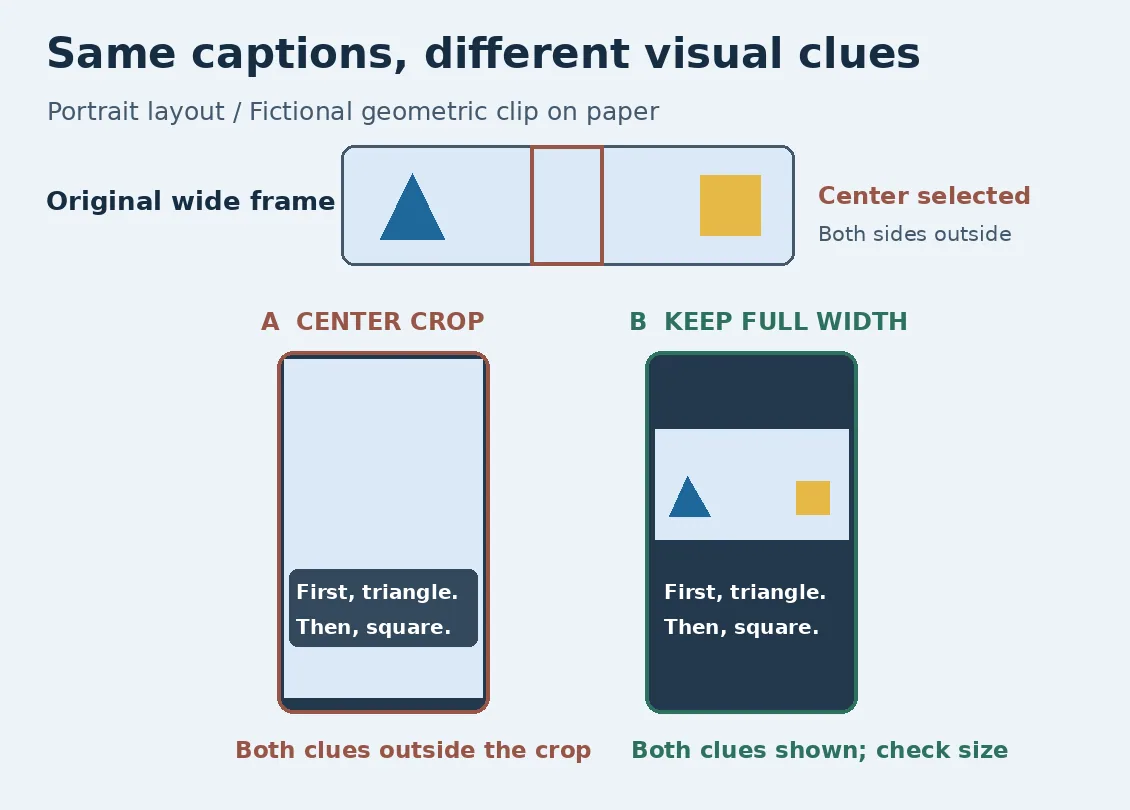
Original static illustration, not a screenshot or test. The words match; A loses both visual clues, while B retains them but still needs a size check.
Ask a reviewer to circle the two named shapes in order and then read the captions back. A lacks both visual clues even if every caption word is correct. B passes only if the shapes are clear, the captions do not cover them and the lines read in order. Otherwise change the layout. This original static example uses no recording, real person, upload, processing or export and is not a CaptionBolt test.
When a full finishing workflow is unnecessary
If you make several aspect ratios every week, compare whether reviewing captions and framing together reduces repeated work. Include narrow-screen review time and rework. If only one line needs correction and the existing framing works, stay in your editor. If both edge details become too small at full width, consider two separate shots instead of having captions explain a missing image.
Content note:This article is based on publicly available information and is intended as a reference for evaluating tools. Features, pricing, and related policies may change at any time; please refer to the latest official information.
Original source:captionbolt.com