Ciaro Pro buying guide: attractive shots can still disagree about the prop
Use a fictional prop card and three hand-drawn frames to check continuity before choosing a shared storyboard and reference tool.
Consider Ciaro Pro if several editors need the same storyboard and repeatedly struggle to find a shared prop reference. The team’s July 2026 product launch describes stories, references and storyboards as parts of the same creative workflow. This guide asks how easily information can be found across those three steps. It does not cover actually producing shots or treat the vendor’s description as proof that they join coherently.
The reference card has two sides; the next shot cannot simply switch
Draw an original reference card for prop P-03: a purple paper triangle with a white dot on the front and an orange line on the back. Make three frames for a fictional paper craft film. Frame 1 shows the front and its white dot. In frame 2 the triangle has made a quarter-turn in the plane of the image, so the white dot remains visible. Write “flip to the back” beside frame 3 and show the orange line there. Also draw an incorrect frame 2 that records the same in-plane turn but replaces the white dot with the orange line. Ask two readers who have not heard the setup to find the unexplained change of face and point to the mark on the reference card or storyboard that supports their answer.
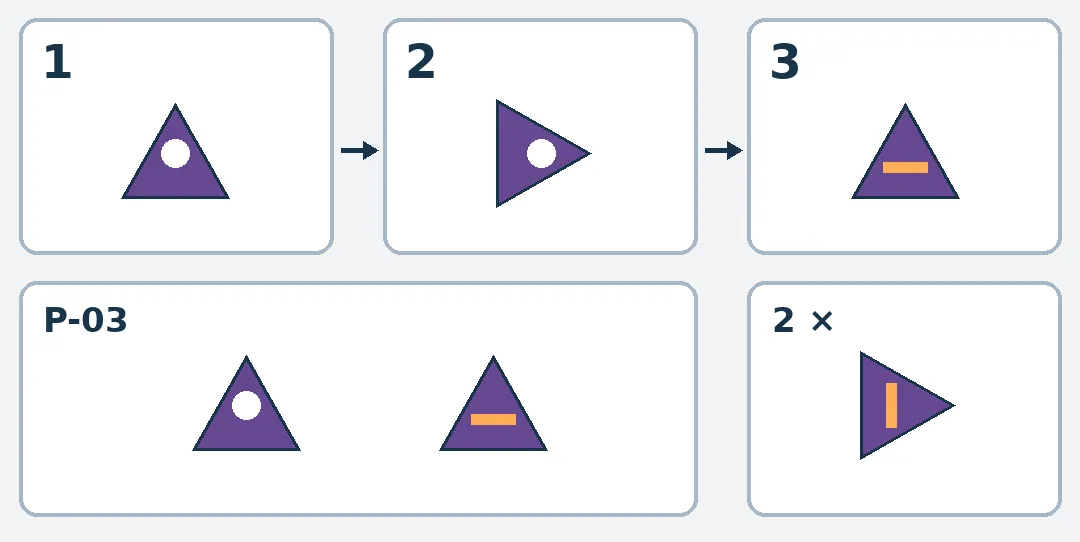
Hand-drawn P-03 comparison, not a product screenshot. Frame 2 only turns the prop in the image plane, so the white dot stays. Frame 3 shows the orange line only when the flip is documented. The bottom-right example switches faces early without evidence.
Now cover the “flip to the back” note on frame 3. If the orange line only lets readers guess a flip happened, mark the change of face as unverified. Do not turn a guess into an action that the script has already explained. A shot can look good and still fail the handoff if its prop ID, orientation or reason for a change of face cannot be traced. This is a hand-drawn example, not a Ciaro Pro field, storyboard or result. It uses no real people, external assets, generation, uploads, accounts or connections.
When a storyboard sheet is enough
For only a handful of shots and one reference card everyone can find, a paper table can record the shot ID, prop ID, visible face and why it changes. If the same prop appears across many shots and references often go missing when editors change, compare Ciaro Pro’s way of organizing the work. First verify whether the team can keep an independent copy of the storyboard and reference card, and how much extra explanation the handoff needs. Do not assume a storyboard view supplies suitable versioning, export formats or continuity.
Content note:This article is based on publicly available information and is intended as a reference for evaluating tools. Features, pricing, and related policies may change at any time; please refer to the latest official information.
Original source:www.producthunt.com