Cleanup.pictures buying guide: remove a speck without redrawing the lines you need
Check continuity in an original geometry sketch. A filled area is not original information.
Compare local filling in Cleanup.pictures if you only need to remove an irrelevant mark from your own sketch that isn’t evidence. The developer’s October 20, 2021 release describes a browser tool for removing objects and flaws, and the official site describes inpainting as filling a selection. What remains is a fill, not rediscovered original detail or a guarantee that adjacent lines stay unchanged. Don’t substitute this edit for the original when facts, attribution or original condition must be preserved.
Draw two parallel lines on paper and place an unrelated square speck between them with a gap from each. On one sheet imagine the speck gone with both lines intact. On another remove it but leave a gap in the closer line. Have the editor look at thumbnail and full size, then cover the small selection and check the two unselected lines separately. Only pass if the speck is gone and line position and continuity stay the same. A cleaner picture does not excuse a shortened line. This is hand-drawn paper only; no real image was uploaded or erased.
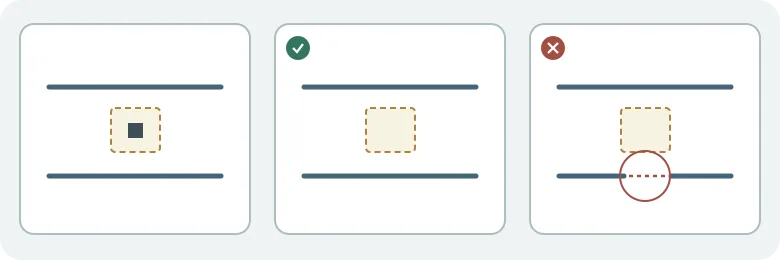
If the geometric image can be redrawn, deleting the independent mark in the original vector file is easier to verify. Compare filling only if layers are unavailable, the aim is localized appearance and the recipient can compare with the original. Keep the unchanged original and count per-image rework. No marks were concealed, and no real objects, people, ads, copyrighted materials, account or execution was involved.
Content note:This article is based on publicly available information and is intended as a reference for evaluating tools. Features, pricing, and related policies may change at any time; please refer to the latest official information.
Original source:www.producthunt.com