Clip Studio AI buying guide: if the script says ‘stop outside,’ where is the square in the last frame?
Use original geometric storyboards to compare an endpoint with the script, without making a video.
For a short video tasked with explaining a condition visually, compare Clip Studio AI on whether its frames stay true to the words. This is clipstudio.ai, not CELSYS Clip Studio Paint. The service names the domain in its August 2024 materials and describes preparing a video brief from text in documentation updated August 6, 2026. Its product page describes story-to-video. These sources do not establish historical render times, asset capabilities or measured performance.
Draw a two-frame paper storyboard. The script says the blue square moves left to right and stops outside the circle. The first frame puts it to the left. End frame A places it inside; B places it to the right, outside. Judge the endpoint, not drawing quality. Two stills cannot show whether it crossed through the circle on the way. A fails the stated endpoint even with smooth edges; B passes this check. Original shapes only; no people, sound, accounts, generation or publication.
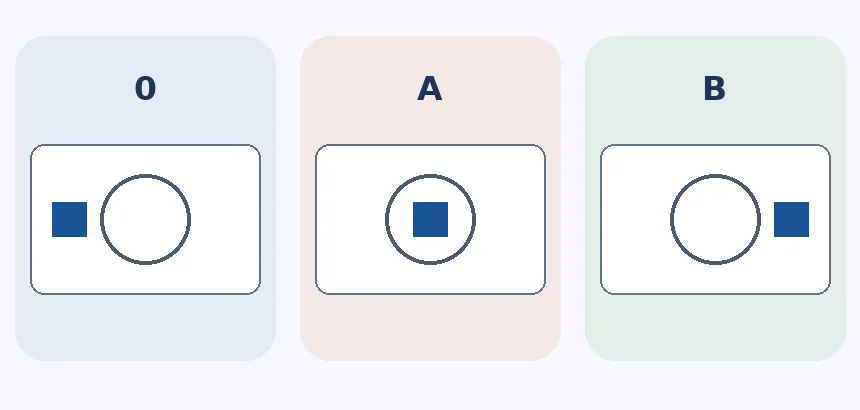
If two hand-drawn frames tell the story, start there. Compare Clip Studio AI only when scripts often become many frames and you can check decisive conditions frame by frame. If the boundary is unclear or script and frame conflict, leave it unverified rather than deliver it.
Content note:This article is based on publicly available information and is intended as a reference for evaluating tools. Features, pricing, and related policies may change at any time; please refer to the latest official information.
Original source:clipstudio.ai