Clipwing buying guide: Joining clips must not turn two takes into one
Use original storyboards with the same beginning and different endings to check clip provenance and avoid implying a sequence that never occurred.
Clipwing is worth comparing when you need to turn a longer, original explanation into short clips. Its May 10, 2024 launch post describes cutting long content into shorts; the official tools page also describes choosing clips from a transcript. Here we use only the idea of selection, not today's options as launch specifications. A short clip does not necessarily preserve context. The check is for take continuity, not subtitle timing or sharing.
Draw two fictional storyboards on paper. Take A starts with the circle in the left slot and ends with it still there. Take B starts the same way, then moves the circle right, and ends with the circle in the right slot. Label the starts and ends A1, A2, B1 and B3. The draft card lists only A1→B3, leaving out the B2 movement and the change of take. It fails if a reader thinks the circle in A reached the right slot. Use A1→A2 for the complete result of one take. To show two different results, explicitly label takes A and B without implying an uninterrupted sequence. Everything is hand-drawn shapes and paper cards; no video, sound, account, or posting.
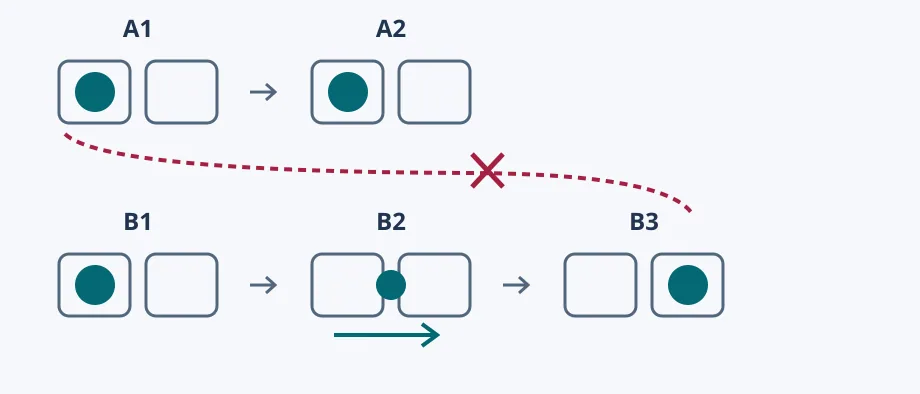
For a single cut with frame numbers, a local log of start, end, and take usually suffices. If you often sort many similar clips, compare whether the source mapping and original material remain available for review, especially when one beginning has different endings. Include the time spent checking and correcting mistaken cross-take readings. This is not an actual edit, upload, or external workflow.
Content note:This article is based on publicly available information and is intended as a reference for evaluating tools. Features, pricing, and related policies may change at any time; please refer to the latest official information.
Original source:www.producthunt.com