Compass Calendar buying guide: moving keyboard focus is not the same as moving an event
A paper grid separates visual focus from the result of an edit without touching a real calendar.
In a keyboard-first calendar the harder question may be which item you have selected, not how to remember a key. The Compass Calendar team’s August 2026 launch describes shortcuts that reduce keystrokes; the project also describes a command palette and keyboard navigation of time slots. That is an interaction pattern, not proof that each edit lands as intended.
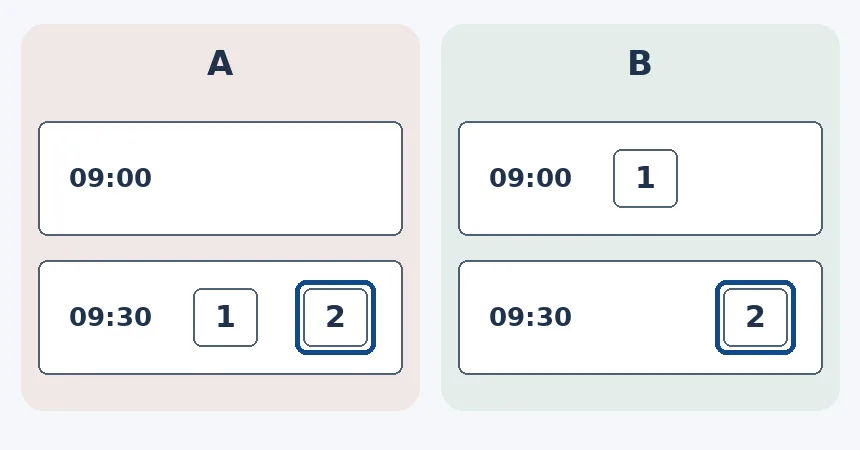
Draw paper slots at 09:00 and 09:30. Card 1, Exhibit Label, is in the first, and Card 2, Blank Demo, in the second. Move focus to Card 2 on paper, leave Card 1 alone. In A the outline moves to the second slot but Card 1 now says 09:30. In B the second has focus and both items retain their times. Read focus and changes separately. Only B fits. No app test, keystrokes, real calendars, edits or notifications.
If you rarely use a keyboard or rely on a familiar calendar, keep it. Compare Compass Calendar if you often read schedules with keys and can distinguish visible focus, selection and actual edits. Leave ambiguous results for manual review.
Content note:This article is based on publicly available information and is intended as a reference for evaluating tools. Features, pricing, and related policies may change at any time; please refer to the latest official information.
Original source:www.producthunt.com