CreArt guide: mark the light detail that must survive background removal
An original arrow sign separates outer white, a white marking and an intended opening.
Removing a background does not mean removing everything light. The December 1, 2025 notes for CreArt iOS version 2.7.0 (App Store ID 6458535840) list background removal separately from local object removal. Their scopes differ. The notes do not guarantee specific details are preserved or establish the web version’s features. This is a paper example, not a test.
Draw a dark blue sign with a white arrow, an intended square opening at lower right and white outside the sign. The acceptance list says remove outer white, keep the arrow, leave the opening empty. Hypothetical A marks all white for removal and loses the arrow; B distinguishes the three areas, retaining the arrow without filling the opening. Check whether the arrow can be read and the hole remains empty; a clean edge is not enough. No alternate backgrounds, generated images or real photos.
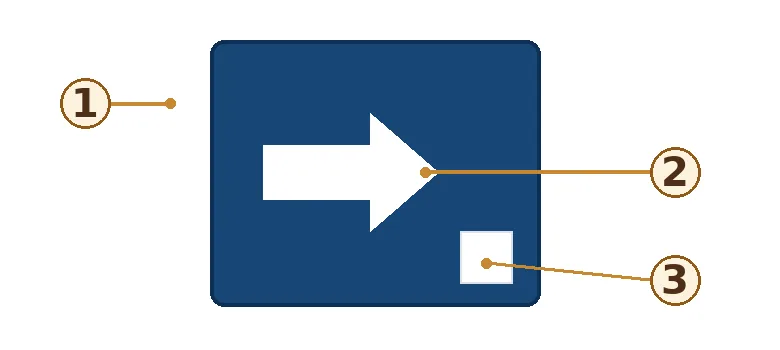
If a hand-drawn original already separates those elements, keep three paper notes on their roles. Compare CreArt iOS if you often work with your own flat artwork and need to keep inner color details while removing the outer background. If the marking and opening cannot be confirmed separately, do not count a pass. No original is processed, nothing is uploaded, and no account is used.
Content note:This article is based on publicly available information and is intended as a reference for evaluating tools. Features, pricing, and related policies may change at any time; please refer to the latest official information.
Original source:apps.apple.com