Decato guide: An item fits, but can you still open the box next to it?
A fictional tabletop checks what fits at rest and what needs space in use.
A layout that looks like everything fits may hide an item that can no longer be used. Decato’s August 2026 terms list layouts, dimensions, and fit checks, and warn that generated judgments can be wrong. Check a static fit separately from added space in use; a rendering is not a measurement.
Two paper layouts for one tabletop
Draw an eight-cell strip from left to right for a fictional stand. A fixed box occupies cells 1–3. In this paper top view, its open lid additionally occupies 4–5. Leave the box in place. Put a two-cell sign at 4–5 in A and at 6–7 in B. With the box closed, both signs fit. There are no real measurements, objects, rooms, or purchasing details.
Add the strip marked “opening footprint” at 4–5 to both. A’s sign overlaps it and they cannot both be used as drawn; B does not overlap. Move B’s sign to 5–6. Even one shared cell is a conflict, not something to round away. Ask someone to show the static and added areas cell by cell. “Looks better” doesn’t explain a pass.
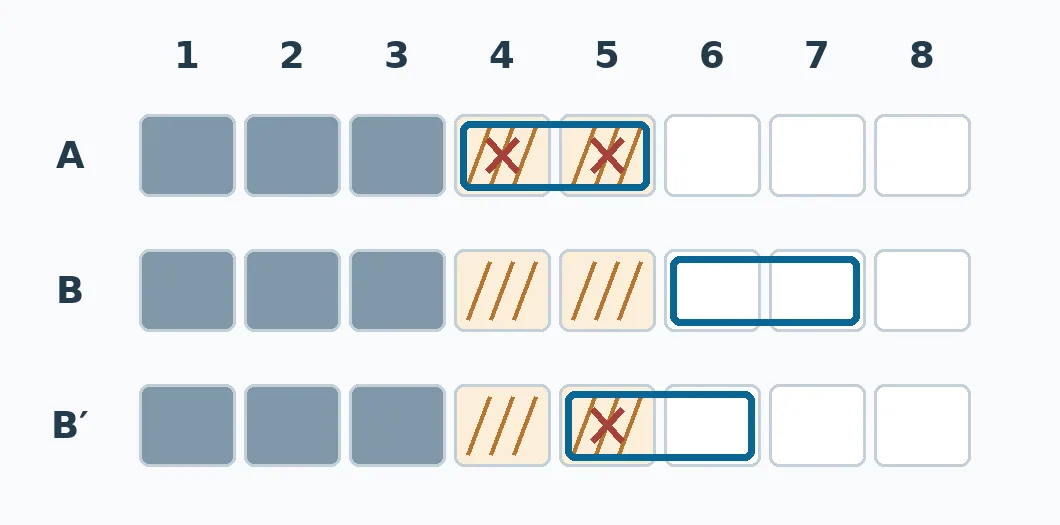
Dark is the box; stripes show added lid space, blue outlines the sign, and red crosses mark overlap. Count the shared cells rather than judging the look. Original paper example, not dimensions for a real space.
For static placement, start with grid paper
If you often compare dimensions and space needed in use, Decato’s fit-checking approach is worth reviewing. For a few fixed items, a grid that shows dimensions and footprints is usually enough. Nothing was run in Decato. The example neither shows it recognizes an opening lid nor gives installation, passageway, or safety clearance advice.
Content note:This article is based on publicly available information and is intended as a reference for evaluating tools. Features, pricing, and related policies may change at any time; please refer to the latest official information.
Original source:decato.ai